Referral Automations
Referral automations do routine co-sell work for you. Most are switches on your co-sell configuration. A few live on the cloud partner’s integration instead.
| Automation | What it does | Where to switch it on |
|---|---|---|
| Auto-Share | Shares every CRM opportunity that meets your criteria to the cloud partner. | Configuration › Outbound › Settings |
| Auto-Enrich | Fills blank company and contact fields on a referral before you share it. | Configuration › Outbound › Settings |
| Auto-Delete (outbound) | Deletes the CRM record when the cloud partner rejects your referral. | Configuration › Outbound › Settings |
| Auto-Link | Links an accepted AWS Marketplace private offer to the AWS referral for the same deal. AWS only. | AWS ACE integration |
| Auto-Accept | Accepts inbound referrals from AWS and Azure. | AWS ACE or Azure Marketplace integration |
| Auto-Delete (inbound) | Deletes the CRM record when you reject an inbound referral. | Configuration › Inbound › Setting |
| Auto-Sync Contacts | Writes contacts from inbound referrals into your CRM. | Configuration › Inbound › Setting |
Open your configuration in Co-Sell › Settings › Configs. See Configuration.
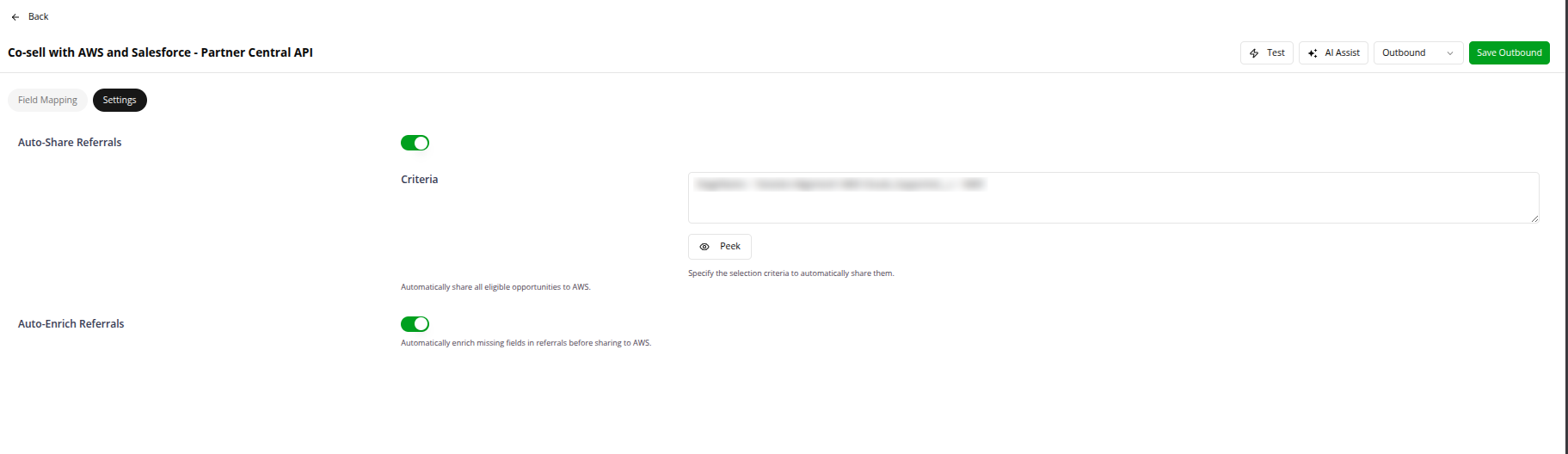
Auto-Share Referrals
Auto-share submits every opportunity that meets your sharing criteria, with no manual action. It uses your outbound field mapping for every referral it shares.
Choose which opportunities to share (Salesforce)
The Criteria field under Auto-Share Referrals limits auto-share to the records you want. Only records that meet the condition go into the next run. The Criteria editor has two tabs:
| Tab | What you get |
|---|---|
| Builder | A visual condition tree. Pick a field, an operator and a value, and combine rows with AND / OR groups. |
| Advanced (SOQL) | The raw Salesforce SOQL predicate, evaluated against the selected Salesforce object. |
Some SOQL has no Builder equivalent: subqueries, function calls and unary NOT. When Fours can’t parse the saved predicate, it keeps you on Advanced (SOQL) and shows “This query can’t be edited in the Builder — keep it in Advanced (SOQL).” The predicate still works.
Builder operators depend on the field type:
| Field type | Operators |
|---|---|
| String / picklist | =, !=, contains, not contains, starts with, not starts with, ends with, not ends with, is blank, is not blank, IN, NOT IN |
| Number / date / datetime | =, !=, >, <, >=, <= |
| Boolean | =, != |
Date values can be absolute or relative:
| Mode | What you pick |
|---|---|
| Absolute | A date from the calendar picker. |
| Relative | A rolling Salesforce date literal: TODAY, YESTERDAY, LAST_N_DAYS:7, LAST_N_DAYS:30, LAST_N_DAYS:90, LAST_90_DAYS, NEXT_90_DAYS, THIS_QUARTER, THIS_MONTH. |
Use Relative when the window should move with time. For example, LAST_N_DAYS:30 stays current without monthly edits.
How Advanced (SOQL) is evaluated. Fours embeds your predicate into a SOQL query.
- The object is Opportunity by default. You can name another object.
- For syntax and operators, see the Salesforce SOQL guide.
- Find field names in Salesforce › Setup › Object Manager › <Object> › Fields & Relationships. Use the Field Name.
Preview matches runs the current criteria against Salesforce without saving. The Opportunities matching your criteria panel lists each match with its ID, Name, Stage and Amount. An empty result means nothing matches right now. Check it before you turn auto-share on.
Choose which deals to share (HubSpot)
In HubSpot, a Segment (previously called a List) filters what auto-share picks up. Add the Segment ID to include only deals in that segment.
Find the ID in HubSpot › CRM › Segments › <Segment Name> › Details › ILS Segment ID. See the HubSpot documentation.
Retries
Auto-share retries a referral the partner rejected. A CREATE_FAILED referral goes back into the next run, and Fours updates the existing record instead of creating a duplicate.
| Retried automatically | CREATE_FAILED |
| Never retried | UPDATE_FAILED, PENDING_CREATE, DRAFT |
| Retry limit | 16 attempts, roughly 48 hours |
On AWS, a deal that fails Fours’ own checks, before anything reaches AWS, is also saved as CREATE_FAILED, with the reason on its status, when the automatic fix can’t repair it. An example is an Estimated AWS Monthly Recurring Revenue that is empty, 0 or not a number (see Co-Sell Fields in ACE). These count toward the same limit. Auto-share sends no Create Failed notification for them, so check the referral list.
After 16 attempts, the referral stays CREATE_FAILED. The cause is almost always data the partner keeps rejecting. Fix the field, then use Re-submit on the referral.
Auto-Enrich Referrals
Auto-enrich fills missing company and contact details when you preview or prepare a referral to share. It uses Fours AI. You see the filled values in the preview.
It fills only empty fields. It never overwrites data in your CRM, and it never writes to your CRM records at all.
Three features called “enrichment”
Three features share the word enrichment. They do different things:
| Feature | What it fills | When it runs |
|---|---|---|
| Auto-Enrich Referrals | Blank fields on the referral you are about to share, such as address, website and contacts | At share time, when the referral is previewed or prepared |
| CRM intelligence-signal enrichment | Partner engagement and marketplace signals, written into mapped fields on your Salesforce or HubSpot records | Every 2 hours |
| AWS lead enrichment | New AWS leads, created from your Salesforce Accounts | Once a day at 03:15 UTC while its automation is on |

What the CRM record needs
Auto-enrich needs a starting point on the record:
- For company details: the company name, or its website or domain.
- For contact details: the contact’s email, or their first and last name plus company details.
Without these, Fours AI can’t find more. It may also find nothing for some companies.
What it can fill
| Cloud partner | Company | Contact |
|---|---|---|
| AWS | Name and website Full address (country, state, city, street, postal code) Industry | Email First and last name Job title |
| Azure | Name Full address (country, state, city, street, postal code) | Email First and last name Job title |
| GCP | Organization name and domain Full address (country, state or province, city, street, postal code) Industry Region and employee count | Email First and last name |
The exact fields can vary by partner integration.
Auto-Delete Referrals
Auto-delete appears twice, once for each direction. The two trigger on different rejections:
| Setting | Triggers when | What it removes |
|---|---|---|
| Outbound Auto-Delete | The cloud partner rejects your referral | The CRM opportunity or deal, and the referral in Fours |
| Inbound Auto-Delete | You reject an inbound referral | The CRM opportunity or deal, and the referral in Fours |
The referral is soft-deleted in Fours. Soft-deleted referrals are hidden by default and can’t be reused or referenced.
Auto-Link Referrals (AWS only)
Auto-link attaches an accepted AWS Marketplace private offer to the AWS referral for the same deal. The ACE opportunity then records the offer the deal transacted through.
Turn it on for your whole organization on the AWS ACE integration. In Settings › Integrations, click Edit on the AWS ACE integration and turn on Auto-Link Referrals. It works only on an ACE integration that uses the Partner Central API.
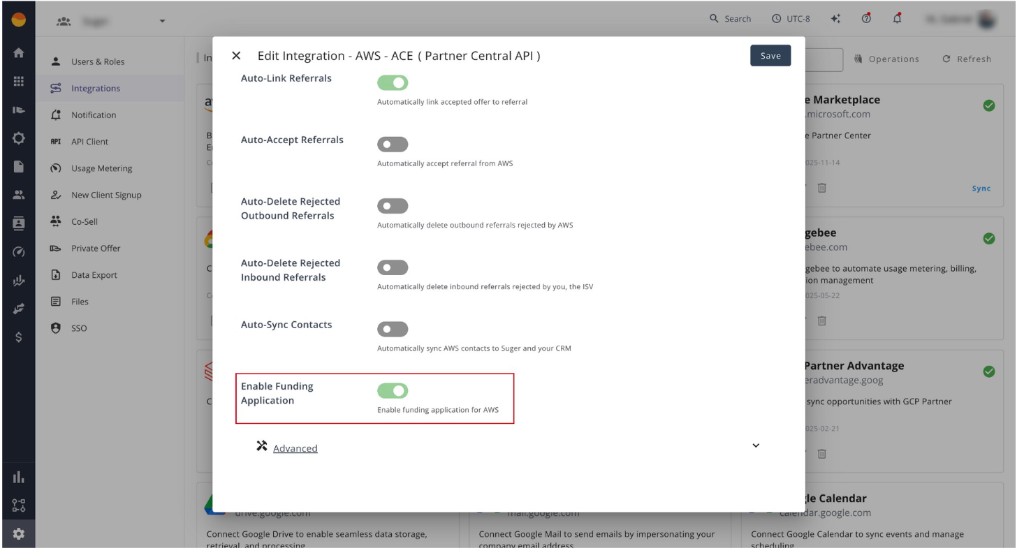
An offer and a referral belong to the same deal when both carry the same Salesforce opportunity, HubSpot deal or Dynamics 365 opportunity. Fours links them:
- When the buyer accepts the offer, if the matching referral is already in Fours.
- Every 4 hours, for any accepted offer that is still unlinked.
Which referrals can be linked. The AWS review status must be Approved, and no offer can be linked yet. Any ACE stage works, including Launched. Sellers often launch before the buyer accepts, and AWS accepts the link.
Limits.
- Each accepted offer links to one referral at most.
- A CPPO offer is never linked. Linking one by hand fails with CPPO offers cannot be linked to an ACE opportunity.
- When the ACE opportunity already has an offer, Fours leaves it alone.
A removed link comes back. If you remove a link in AWS Partner Central or with Unlink Offer, a later run links it again once Fours syncs the removal. This keeps happening while Auto-Link is on.
Auto-Accept Referrals
Auto-accept accepts inbound referrals from AWS and Azure. Google Cloud referrals are never auto-accepted.
Switch it on per cloud, on the integration:
- AWS: turn on Auto-Accept Referrals on the AWS ACE integration. Fours accepts an engagement invitation that is still Pending and has not expired.
- Azure: turn on Auto-Accept Referrals on the Azure Marketplace integration. The switch appears once Enable Cosell is on. Fours accepts a referral whose substatus is Pending.
Each accept runs as its own workflow, listed under Metrics › Logs with the Auto-accept type. See Referral Syncing. On AWS, the accept goes to ACE. On Azure, it starts an outbound sync to Microsoft.
See what Fours accepted. Add the Auto Accepted column from the Columns menu of the Cloud Partners referral table. It is hidden by default. A check means Fours sent the accept. Hover it to see when. The cloud partner confirms the accept separately.
Referrals you accept yourself never get a check. On Azure, an accept gets one only when it started a new sync to Microsoft. If a sync is already running, or your referral approval holds it, the accept is saved without a check.
Auto-Sync Contacts
Auto-sync contacts writes contact details from inbound referrals, such as name, title, email and phone, into your CRM’s contact records. Set SyncMode to “None” to manage contacts yourself.
Troubleshooting
| Issue | Cause | Fix |
|---|---|---|
| Auto-share didn’t share anything | Invalid SOQL (Salesforce) or a wrong ILS Segment ID (HubSpot) | Salesforce: click Preview matches and use single quotes for strings. HubSpot: check the ID against the segment’s details. |
A referral stays CREATE_FAILED | It hit the 16-attempt retry limit | Fix the field the partner rejects, then Re-submit. See Retries. |
| Auto-enrich didn’t fill fields | The CRM record has no company website or domain | Add the website on the Account or Company record. Fours uses it to look the company up. |
Will auto-enrich overwrite data my reps entered? No. It fills only empty fields.
Can I auto-share for only part of my team? Yes. Use the criteria (Salesforce) or a segment (HubSpot) to limit it to owners, regions or product lines. Use Preview matches to check first.
Spotted something wrong or out of date on this page? Tell us and we'll correct it.