Overview
The Overview dashboard is the home of the Multi-Channel Revenue workspace. It shows the health of your revenue lifecycle — from bookings through billing, cash collection, and disbursement — across every connected channel in one view.
Overview
Open the workspace from Revenue → Overview. The left sidebar groups the workspace into two areas:
- Operations — Overview, Revenue Records, Invoices, Cash & Disbursements, Bank Reconciliation, Revenue Recognition.
- Analytics — SaaS Metrics, Channel Performance, Financial Reports.
Settings is available at the bottom of the sidebar.
In Insulin, the same workspace is the Revenue app pinned to the desktop Dock — see Getting Started. There, the controls that change data appear only if your role has revenue write access; the console shows them to every role.
Scope what you see
Two controls at the top of most pages scope everything below them:
- Channel — filter to a single channel (AWS, Azure, GCP, or Stripe) or view All channels. The Settings page is never channel-scoped.
- Date range — the Overview defaults to the last 90 days. Options are Quarter to date (named for the current quarter, e.g. Q3 2026), Year to date, the last 7, 30, 90, or 180 days, the last 1 or 2 years, all time, or a custom start/end date.
Set both before reading the cards below — every amount, ratio, and chart on the page reflects the current channel and date range.
The date range selects two different things. Bookings counts entitlement terms whose start date falls in the range. Billings, Cash Collected, Disbursed, the other trend series, and the channel mix count revenue records whose invoice date falls in it. All time applies no date limit at all, so it also includes terms that start in the future and revenue records that have no invoice date yet.
How revenue reaches the lifecycle cards
Every channel reports revenue in its own shape. Fours normalizes each source into one revenue record, and three of the four lifecycle stage cards — Billings, Cash Collected, and Disbursed — sit on the path that record travels. Bookings is measured one step earlier, on the contract terms of the entitlements each channel reports:
Oracle and Snowflake are drawn with dashed outlines because neither is a fully-managed Overview channel. Oracle is ingest-only — its records flow in from the OCI publisher disbursement report, but Oracle is not a connection you can configure in Revenue Settings. Snowflake appears as a channel on Revenue Records, but not in the Overview channel filter.
The cash stage is not a single line off Invoices: Cash & Disbursements is built from two inputs — the normalized revenue records and the payment transactions behind them — which Fours batches together into one row per payout, then links back to the invoices each payout covers.
Revenue lifecycle stage cards
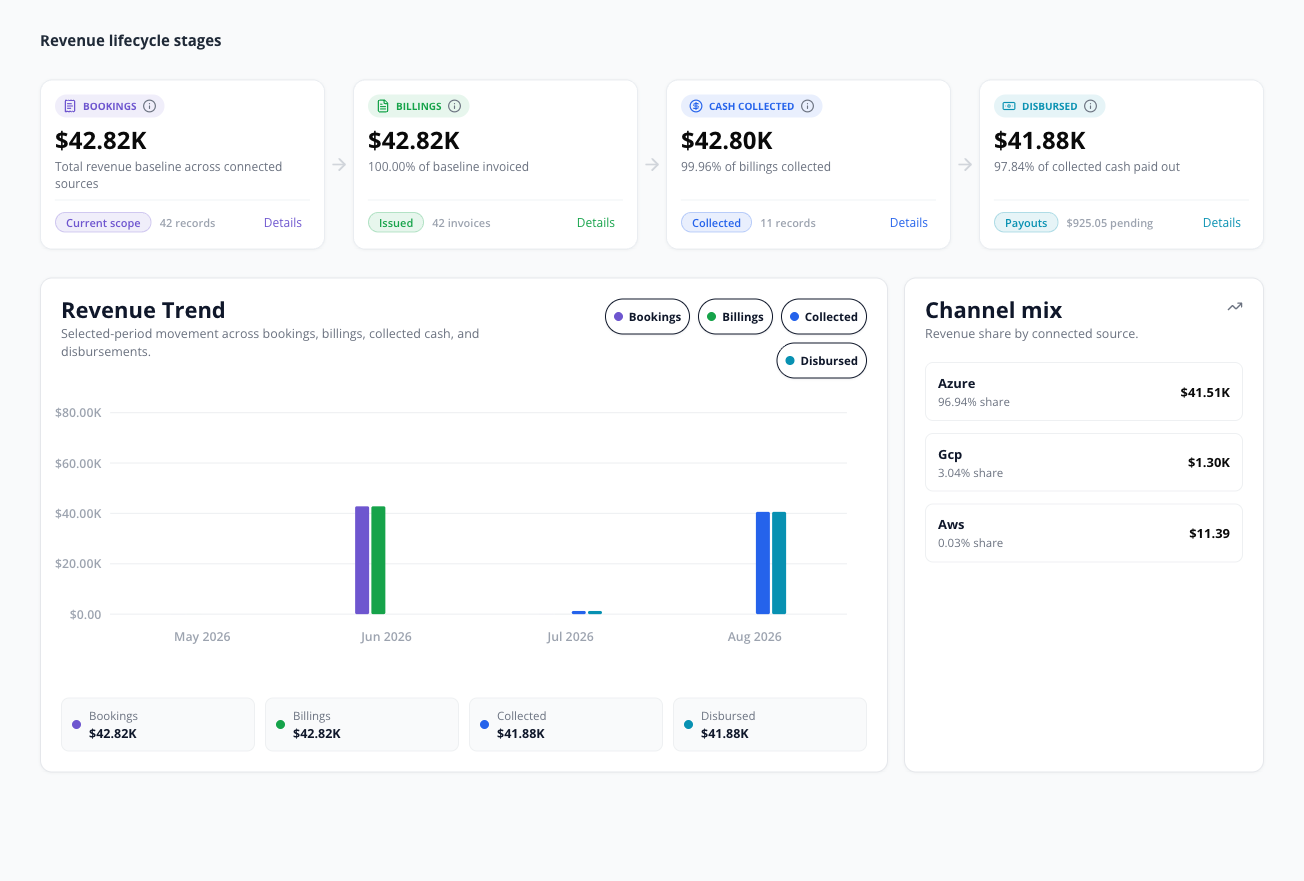
Four cards follow your revenue from signed contract to paid-out cash: Bookings, Billings, Cash Collected, and Disbursed. Each shows a USD amount for the selected channel and date range, a one-line explanation beneath it, and a footer figure — a count, or for Disbursed the amount still pending. Every card carries an in-product tooltip — hover its info icon for a one-line explanation of the metric.
A record’s lifecycle stage is a stored column the database computes for itself. Nothing in Fours writes it by hand: Postgres derives it from what the record carries — a disbursement date, or a collected date, a collected amount, or a paid/partially-paid marker — and rewrites the stored value whenever those fields change. A record therefore advances as new data syncs in, not because someone set a status on it.
Bookings is the one card not built from revenue records: it adds up the committed contract value of the entitlement terms that start in the range, and a plan or quantity change adds only its change in value. The other three cards sum revenue records, and every record amount they use is net of refunds — a voided, canceled, or written-off record counts as zero. Billings uses each record’s net revenue: its base amount when that is stored in USD, otherwise the first non-zero of its invoice amount, collectable amount, and disburse amount, converted at the record’s stored USD rate. Cash Collected starts from the invoice amount instead, then falls back to that same chain. Disbursed uses a chain of its own — the disburse amount first, then the collectable amount, and only then the net-revenue chain.
| Card | What it represents |
|---|---|
| Bookings | Committed contract value from your entitlement terms that start in the selected range. New and renewal terms count at full value; a plan or quantity change counts only its change against the term it amends, so a downgrade lowers the total. Invoices play no part. The footer shows the number of bookings. See the Bookings formula below. |
| Billings | Net revenue of the revenue records that have actually been invoiced — they carry an invoice amount, an invoice date, or a later lifecycle stage. Shown with the share of bookings invoiced and the invoice count. |
| Cash Collected | Records marked paid or partially paid, in the Cash Collected or Disbursed stage, or carrying a disbursement date or amount. The figure is cumulative: a record stays in Cash Collected after it is paid out, and channel fees are not deducted here — they show up at Disbursed. A GCP payout counts here as soon as Google confirms its amount, before its expected payout date. |
| Disbursed | The disbursed amount on records that carry a disbursement stage, date, or amount, with the pending disbursement amount beside it. This card resolves its amount by its own chain — disburse, then collectable, then the net-revenue chain. A GCP record counts only once its expected payout date has passed and Google has confirmed a payout amount. |

Reading the cards left to right (circled above): ① Bookings is the contract value booked in the period, with the number of bookings beneath it; ② Billings shows billings ÷ bookings as N% of bookings invoiced; ③ Cash Collected shows cash collected ÷ billings (e.g. 61.36% of billings collected); and ④ Disbursed shows disbursed ÷ cash collected (e.g. 97.76% of collected cash paid out), with the amount still pending beside it (e.g. $623.04 pending). Pending is cash collected minus disbursed, never below zero.
Select Details on a card to jump to a related page — Bookings opens Revenue Records, Billings and Cash Collected open Invoices, and Disbursed opens Cash & Disbursements. Bookings is not built from revenue records, so the records there will not add up to it.
To find revenue that needs attention, work from the pages that own it: past-due balances and aging buckets live on Invoices, and overdue or failed payouts live in Cash & Disbursements — select its Issues card to list them.
Revenue trend and channel mix
- Revenue Trend plots Bookings, Billings, Collected, and Disbursed over the selected period as grouped bars. Toggle any series on or off using the legend.
- Channel mix lists each channel’s share of revenue and its amount for the period. Channels are ranked by amount, so your largest revenue source sits at the top, and the panel shows at most six channels.
Each trend series is placed on the timeline by a different date. Bookings and Billings each use a single date; Collected and Disbursed fall through a chain of dates until they find one the record actually carries:
- Bookings — the start date of each entitlement term, with the same terms and values as the Bookings card, except that zero and negative values are left out: a downgrade lowers the card but adds no bar.
- Billings — invoice date only. A record with no invoice date is absent from this series.
- Collected — collected date → disburse date → payment due date → invoice date.
- Disbursed — disburse date → provider update → last update, for every channel. A GCP record, which has no disburse date, lands on the date Fours last received an update for it.
The same revenue record therefore lands in a different bucket in each of the last three series, and a record can appear in one series and not yet in another. Buckets are cut in UTC — by day for the 7- and 30-day ranges, and by month for every longer range.
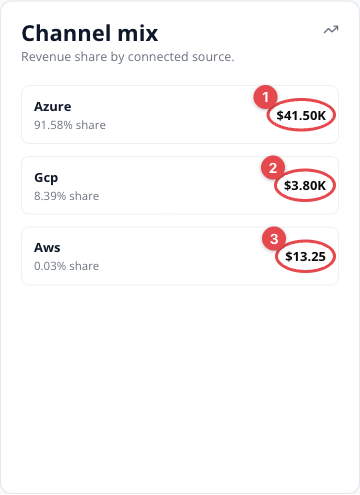
In the example above, ① Azure contributes the most revenue for the period, followed by ② GCP and ③ AWS — the share percentage and USD amount are shown for each connected channel.
KPI calculation formulas
All amounts are in USD — the Overview reports in USD only, as the All amounts in USD label beside the date range shows. Values are aggregated across the selected channel and date range.
Billings, Cash Collected, and Disbursed sum revenue records, and two rules apply to every record amount they use:
- In USD. A USD record’s amounts are used as they are. Any other record’s amounts are converted at the rate stored on the record or, when no rate is stored, in proportion to its stored USD base amount; a record with neither contributes zero.
- Net of refunds, and zero when invalidated. Any refund amount recorded on the record is subtracted — whatever the refund’s status, so a failed or canceled refund that still carries an amount lowers the figure — without taking a positive amount below zero. A record whose payment status is voided, canceled, or written off counts as zero.
A record’s net revenue is its base amount when that is stored in USD, otherwise the first non-zero of its invoice, collectable, and disburse amounts — with both rules applied.
Bookings
Bookings = Σ value of new and renewal terms + Σ (change term value − parent term value)
- Terms in scope — every entitlement term, whatever its status, whose start date is in the selected range and whose channel matches the Channel filter. All time drops the start-date limit.
- Term value — the contract value recorded on the term. When that is zero, Fours derives it from the term’s pricing: the sum of its payment installments or, with no installments, the sum of each commit dimension’s rate × quantity (see the per-channel rows below). With no pricing at all, the term’s stored commit amount is used.
- New and renewal terms — sign-up, auto-renew, and manual-renew terms (manual renew also covers upsells), and terms with no type. They count at full value.
- Change terms — plan-change and quantity-change terms. They count only their difference from the parent term: the term they are linked to, or else the latest earlier term on the same entitlement. A change term with no parent is left out rather than counted in full, and a downgrade is negative, so it lowers Bookings.
- Left out — the sub-terms Fours creates when it divides one commitment into several (the commitment counts once, on its original term), and any term whose value works out to zero.
- Currency — a term in another currency counts only when Fours’ latest daily exchange-rate snapshot has a rate for it — EUR, GBP, JPY, AUD, or CAD — and the range ends on or after the day of that snapshot, as ranges ending today and All time do. Any other non-USD term is left out.
- Count — the card’s N bookings footer is the number of terms that contributed a non-zero amount.
- Limit — Bookings reads at most 10,000 entitlement terms. If more than that start in the range, the Overview can’t be computed and every card shows zero; choose a shorter range.
| Channel partner | Formula | Included/excluded data | Date, currency, and rounding rules |
|---|---|---|---|
| AWS | term value = recorded contract value → Σ payment installments → Σ (rate × quantity) → stored commit amount | As listed above | Dated by term start (UTC); non-USD terms per the Currency rule above; rounded to cents |
| Azure | Same as AWS | As listed above | Same as AWS |
| GCP | term value = recorded contract value → Σ payment installments → Σ (rate × quantity × commit length in months) → stored commit amount | As listed above; the commit length is converted to months — years × 12, weeks ÷ 4, days ÷ 30 — and a commit measured in any other unit is not multiplied | Same as AWS |
| Stripe | Same as AWS | As listed above | Same as AWS |
The card shows the total in compact form with two decimals (for example $45.32K).
| KPI | Applies to | Formula | Calculation details |
|---|---|---|---|
| Bookings | AWS, Azure, GCP, Stripe | See Bookings above | Contract value from entitlement terms, not revenue records. |
| Bookings count (N bookings) | AWS, Azure, GCP, Stripe | count(terms that contributed a non-zero amount) | A plan or quantity change counts as one booking, including a downgrade. |
| Billings | AWS, Azure, GCP, Stripe | Σ net revenue of records that have been invoiced | Records whose invoice date is in the range (All time: every record). “Invoiced” means the record carries an invoice amount, an invoice date, or a lifecycle stage past billing. |
| Invoice count (N invoices) | AWS, Azure, GCP, Stripe | count(records with an invoice date or an invoice ID) | Counts revenue records, not distinct invoices — an AWS invoice split across several contracts counts once per record. |
| Cash Collected | AWS, Azure, GCP, Stripe | Σ collected amount of records that are paid, partially paid, in the Cash Collected or Disbursed stage, or carry a disbursement date or amount | Collected amount = the invoice amount, else the net-revenue chain, with both rules applied. Cumulative — disbursed records stay in. A GCP record counts once Google confirms its payout amount, even before its expected payout date. Channel fees are not deducted here; they show up in the gap between Cash Collected and Disbursed. |
| Cash Collected count (N records) | AWS, Azure, GCP, Stripe | count(records counted in Cash Collected) | — |
| Disbursed | AWS, Azure, Stripe | Σ (disburse amount → collectable amount → net-revenue chain) where a disbursement stage, date, or amount exists | The first non-zero amount, with both rules applied. The refund subtracted is the refund disbursement amount when the record carries one, else the refund invoice amount. |
| Disbursed | GCP | The same amount; a record with an expected payout date counts only once that date has passed and Google has confirmed a non-zero payout amount | Google reports no payout date, so the expected payout date stands in for it. A GCP record with no expected payout date follows the AWS, Azure, Stripe row. |
| % of bookings invoiced | AWS, Azure, GCP, Stripe | billings ÷ bookings × 100 | The ratio printed under the Billings card. 0 when bookings is 0. It can exceed 100%, because the two count different things on different dates. |
| % of billings collected | AWS, Azure, GCP, Stripe | cash collected ÷ billings × 100 | The ratio printed under the Cash Collected card. 0 when billings is 0. |
| % of collected cash paid out | AWS, Azure, GCP, Stripe | disbursed ÷ cash collected × 100 | The ratio printed under the Disbursed card. 0 when cash collected is 0. |
| Pending disbursement ($X pending) | AWS, Azure, GCP, Stripe | max(0, cash collected − disbursed) | Never negative. Because Cash Collected is counted before channel fees, for fee-bearing channels this still includes the fees the channel retains. |
| Revenue Trend — Bookings | AWS, Azure, GCP, Stripe | Σ booking value per bucket, by term start date | The same terms and values as the Bookings card, except that zero and negative values — downgrades — are skipped. |
| Revenue Trend — Billings | AWS, Azure, GCP, Stripe | Σ billed amount per bucket, by invoice date | Billed amount = the invoice amount, else the net-revenue chain, with both rules applied. Zero and negative amounts are skipped. |
| Revenue Trend — Collected | AWS, Azure, GCP, Stripe | Σ collected amount of Cash Collected records per bucket, by the collected-date chain | The same amount as Cash Collected. Zero and negative amounts are skipped. |
| Revenue Trend — Disbursed | AWS, Azure, GCP, Stripe | Σ disbursed amount of Disbursed records per bucket, by the disburse-date chain | The same amount and inclusion rules as Disbursed, including the GCP payout-date rule. Zero and negative amounts are skipped. A GCP record, which has no disburse date, falls to its last provider update. |
| Channel mix | AWS, Azure, GCP, Stripe | channel net revenue ÷ net revenue of all channels × 100 | Amount = Σ net revenue of every record in scope for that channel. Ranked by amount; at most six channels are shown. |
Spotted something wrong or out of date on this page? Tell us and we'll correct it.