Tax corrections
A correction fixes a finding at its source: Fours writes the missing or corrected tax record to your provider on your behalf. Every correction is proposed by Fours, reviewed by you, and written only when you submit it — Fours never writes on its own.
Before you start
- The Admin or Editor role. Viewers see the recommendation but no correction to submit.
- Corrections turned on for your organization, for every correction except Flag for amendment and — outside GCP — Revise tax record — see The corrections switch.
- An open period. A finding in a period Fours considers already filed offers only Flag for amendment; see Amended returns.
Submit a correction
- On the Audit tab, select Take actions on a finding.
- Read the Recommended card. It explains what Fours found and holds the form for the one correction it recommends — there is no choice of correction to make.
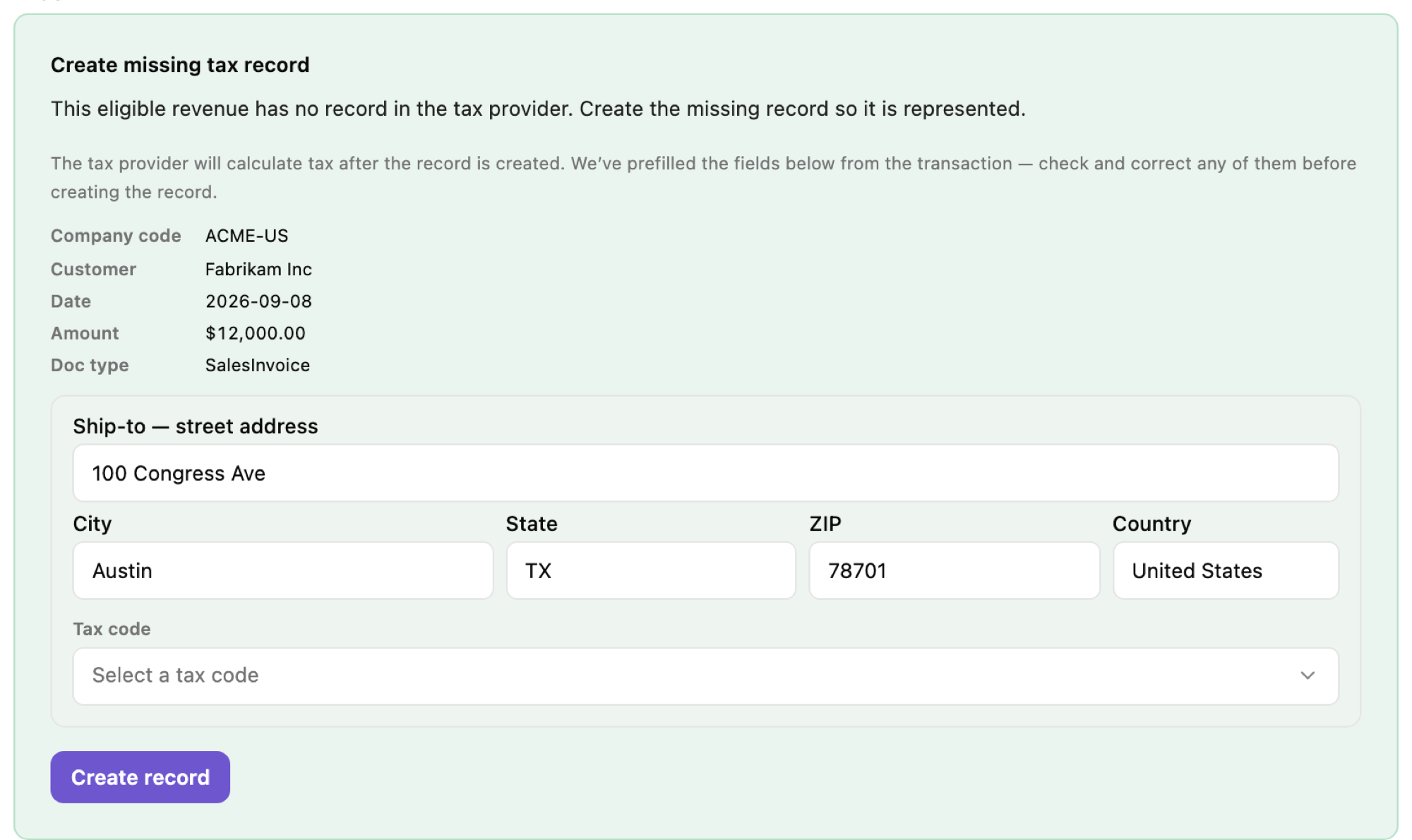
- Check the form. Depending on the correction it shows the buyer’s address, the tax code, the document to change, or the fields that differ between Fours and the provider. If the product has no tax code yet, you are asked to choose one from your provider’s tax-code catalogue before the correction goes through.
- Select the correction’s button — Create record, Push revision, and so on.
The correction then runs in the background, and the card shows “Submitting to the provider…” until it settles:
- Succeeded — “Done — the finding is now covered.” The finding turns Covered, and the revenue coverage on the Audit tab rises.
- Failed — “The provider rejected this action:” with the provider’s reason. Adjust the form and submit again.
Before it writes anything, the running correction checks again that the finding is still open, that your provider and selling entity haven’t changed, that corrections are still turned on, and that you still have the Admin or Editor role. If any check fails, nothing is written and the correction fails. A write that does not go through is retried automatically — up to four attempts within 30 minutes — before the correction is marked Failed.
The corrections
| Correction | Button | Recommended when | Needs corrections turned on |
|---|---|---|---|
| Create missing tax record | Create record | An Uncovered sale you are liable for. | Yes |
| Create refund tax record | Create refund record | An Uncovered refund whose original sale has a tax record Fours created. The refund is taxed at the original sale’s rate; a refund that spans several original months is credited at one rate, so a rate change between those months makes the credit slightly too high or too low. | Yes |
| Record marketplace-collected tax | Record marketplace-collected tax | An Uncovered sale the marketplace collected tax on. The record shows the tax as collected by the partner, with zero liability for you. | Yes |
| Revise tax record | Push revision | An Ambiguous finding: the record exists but disagrees with Fours on some fields. The form lists each field with the provider’s current value and Fours’ corrected one. | No |
| Void duplicate marketplace tax | Void the duplicate tax | A Duplicate finding where a record Fours created charges tax on a sale the marketplace already collected tax on. The record is kept and its tax set to zero. | Yes |
| Flag for amendment | Flag for amendment | An Uncovered or Ambiguous finding, with a known jurisdiction, in a period that is already filed. Nothing is written to the provider — see Amended returns. | No |
Some findings have no correction:
- Two provider records cover the same invoice (Duplicate provider records). Fours does not offer to cancel either one, because it cannot tell which of them is safe to remove. Cancel the redundant record in your provider’s own console, or ignore the finding.
- Covered findings need nothing; a finding that already has a succeeded correction accepts no other.
GCP sales. For a GCP finding, Fours decides between Create missing tax record and Record marketplace-collected tax when you submit, from the buyer’s country: in Australia, Israel, or Switzerland you are liable, so a record with tax is created; anywhere else the sale is recorded as marketplace-collected. The same applies when you submit Push revision on a GCP finding, so on GCP a revision also needs corrections turned on. If the buyer’s country can’t be determined, the submission is refused — correct the buyer’s address and try again.
What Fours writes to Avalara
| Correction | What Fours writes |
|---|---|
| Create missing tax record | Creates and commits a sales invoice. |
| Create refund tax record | Creates and commits a return invoice, taxed at the rate of the original sale’s date. |
| Record marketplace-collected tax | Creates a sales invoice with its tax overridden to zero, giving Marketplace facilitator collected the tax as the reason. |
| Revise tax record | Adjusts the existing document and commits it again; extra documents for the same sale may be voided. |
| Void duplicate marketplace tax | Adjusts the document so its tax is zero; the document is kept. |
| Flag for amendment | Nothing — the flag is recorded in Fours only. |
The corrections switch
The switch in Settings (Allow Fours to create missing records during setup) is your organization’s consent to write to the provider. It governs four corrections — Create missing tax record, Create refund tax record, Record marketplace-collected tax, and Void duplicate marketplace tax — so with it off, those are never recommended. Revise tax record (except on GCP sales, see above) and Flag for amendment do not depend on it.
It is checked again when a submitted correction runs, so turning it off also stops corrections still waiting to run.
Action history
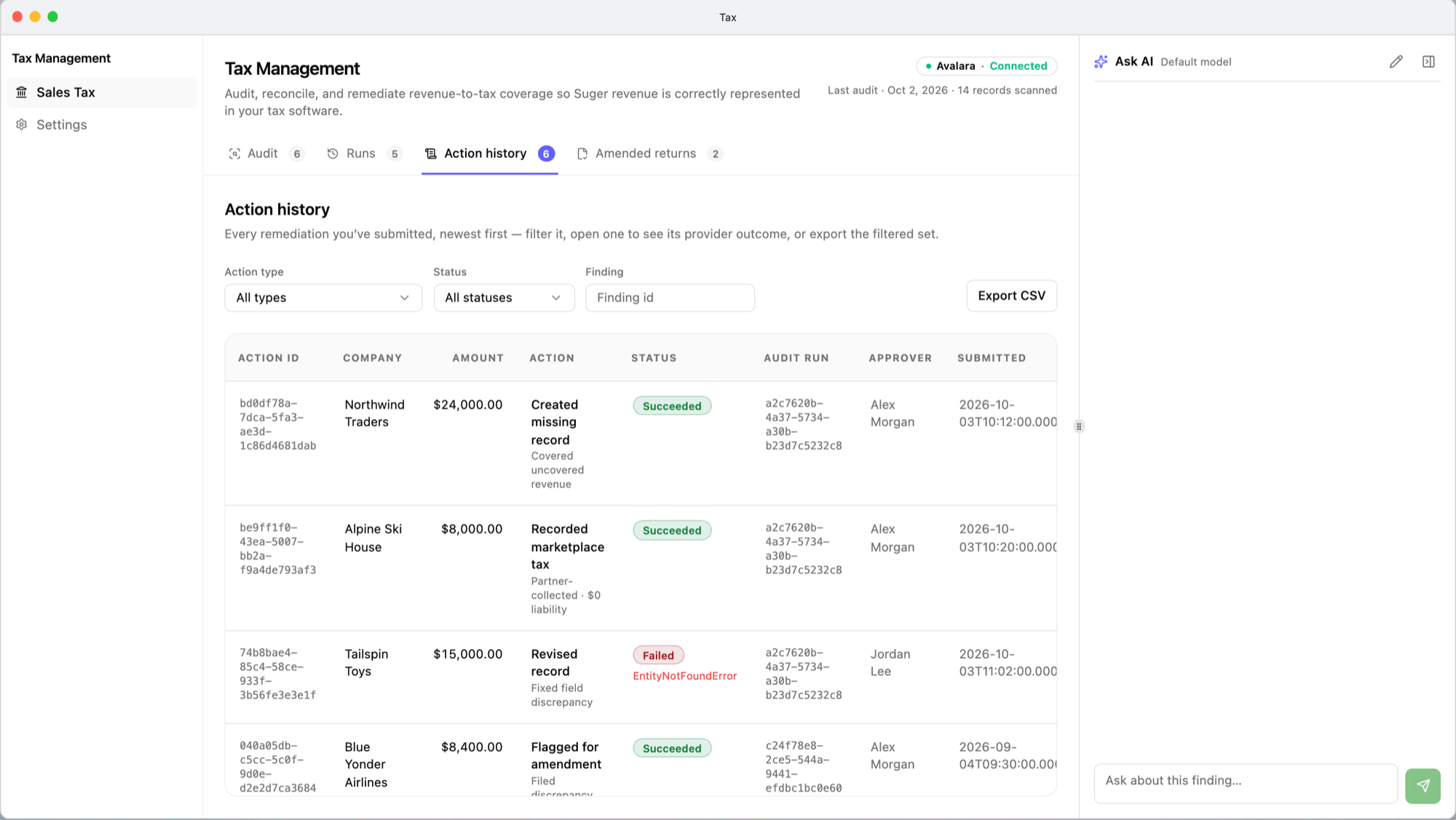
Tax → Sales Tax → Action history records every correction submitted in your organization, and every finding flagged for amendment, newest first.
| Column | Shows |
|---|---|
| Action ID | The correction. |
| Company | The buyer, as recorded when the correction was submitted. |
| Amount | The finding’s taxable amount, as it was when the correction was submitted. |
| Action | The correction and what it did — for example Created missing record · Covered uncovered revenue. |
| Status | New, Running, Succeeded, or Failed (with the provider’s error code). |
| Audit run | The audit the finding came from. |
| Approver | Who submitted it. |
| Submitted | When. |
| Provider record | The record written in your provider. |
Filter by Action type, Status, or Finding, and select Export CSV to download the list. Select a row for its detail: the correction, finding, audit run, status, who submitted it, and the provider record — or the provider’s error for a failed one.
Every member of the organization can read and export Action history.
Related
- Audits and findings — where findings come from.
- Amended returns — what to do when the period is already filed.
- Set up Tax — the corrections switch and the selling entity.
Spotted something wrong or out of date on this page? Tell us and we'll correct it.