Dynamics 365 App
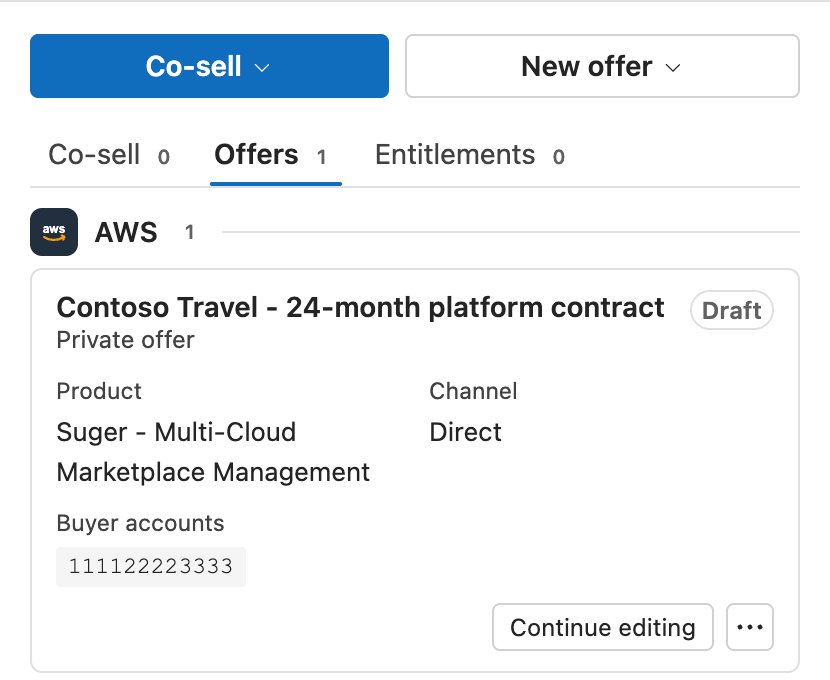
The Dynamics 365 App is a managed solution that you install in a Dynamics 365 Sales environment. A managed solution is a Dataverse package that an admin installs and upgrades as one unit. The app adds a Fours button to the opportunity record page. The button opens a side pane that shows the co-sells, offers and agreements of that opportunity. Your sales team creates and manages AWS Marketplace deals from the pane, and does not leave Dynamics 365.
Users do not sign in to Fours. The app calls Fours through the org-level Microsoft Dynamics 365 integration of your organization. What each user can do comes from the Fours security roles that the user has in Dynamics 365.
What the app does
From the side pane of an opportunity, your team can do these tasks:
- See the co-sells, offers and agreements that are linked to the opportunity, grouped by cloud. An agreement is what the console calls an entitlement.
- Create AWS Marketplace private offers for SaaS, Container, AMI, Professional Services and Machine Learning products, or save them as drafts.
- Create resale authorizations for a channel partner, and resale offers when your organization resells. AWS calls these Channel Partner Private Offers (CPPO).
- Create offer sets of 2 to 7 offers on different products.
- Create an amendment to an AWS contract agreement that is active or pending start.
- Cancel an offer, extend its expiry date, clone it, or notify its contacts.
- Opt out of the auto-renewal of an agreement, adjust its renewal uplift, request its cancellation, or make a billing adjustment.
- Share the opportunity with AWS as a co-sell. Fill with AI fills the co-sell form from the opportunity, and you select the changes to apply.
- Hold offers for approval. When offer approval is on, a Fours Approver approves each offer before Fours creates it on AWS.
Start here
- Install the Dynamics 365 App: install the solution, set up the application user, and connect Dynamics 365 in the Fours Console.
- Security Roles: give each user a Fours role. A user without a Fours role cannot use the app.
- The Fours Side Pane: open the pane on an opportunity and learn its tabs and cards.
- Create and Manage Private Offers: create your first AWS private offer from an opportunity.
Pages in this section
- Install the Dynamics 365 App: the five setup steps, from the solution install to the first open of the pane.
- Security Roles: what each Fours role allows, and how to assign the roles in the Power Platform admin center.
- Update the App: how a new version reaches your environment, and what stays the same after an update.
- The Fours Side Pane: the tabs, cards and actions of the Fours side pane on an opportunity.
- Create and Manage Private Offers: private offers, offer sets and amendments, and the actions on offers and agreements.
- Resale Authorizations and Resale Offers: authorize a channel partner to resell your product, or resell the product of another seller.
- AWS Co-Sell: share an opportunity with AWS, use Fill with AI, and work the co-sell record.
- Offer Approval: turn on offer approval, submit offers, and approve them as a Fours Approver.
- FAQ and Troubleshooting: short answers to common questions, and fixes for the messages that the pane shows.
Scope and limits
Spotted something wrong or out of date on this page? Tell us and we'll correct it.