Amended tax returns
Once a tax period has been filed with the authority, a missing or wrong tax record can’t simply be written into it. Tax gathers those discrepancies into amended returns — one open draft per jurisdiction and filing period at a time — so you can review them, get them signed off, and keep a record of what you amended.
When a period counts as filed
Fours receives no filing confirmations from your provider or from tax authorities, so it decides for itself whether a finding’s period is filed. A period counts as filed when either is true:
- The provider has locked the tax document.
- The filing deadline has passed for the jurisdiction’s filing frequency (dates in UTC):
| Filing frequency | Period | Counts as filed from |
|---|---|---|
| Monthly | a month, e.g. March 2026 | the 20th of the following month |
| Quarterly | a quarter, e.g. Q1 2026 | the last day of the month after the quarter ends |
| Annually | a year, e.g. 2026 | January 31 of the following year |
Each jurisdiction’s frequency is set under Tax registrations in Settings; any jurisdiction left unset is treated as Monthly. These deadlines are simplified estimates, not each authority’s real calendar — in particular, a period you filed before its deadline is not treated as filed until the provider locks its documents or the deadline passes.
A finding in a filed period offers no correction that writes to the provider: its Recommended card reads Period already filed and offers Flag for amendment instead. The Audit tab also shows a banner when a run contains filed-period findings.
Flag a finding
- Open the finding from the Audit tab, or select Review → next to it in the filing calendar.
- In the Recommended card, review Originally filed, Corrected, and the difference, then select Flag for amendment.
Flagging needs the Admin or Editor role and is available on Uncovered and Ambiguous findings (and Needs review findings from older audits) that have a known jurisdiction. It writes nothing to the provider. The finding joins the Draft amended return for its jurisdiction and filing period, which is created if it doesn’t exist yet. A finding can be flagged only once, and every finding in one return must be in the same currency.
The figures are copied from the finding when you flag it — a later audit does not change them — and the return keeps the filing frequency that applied at that moment.
Filing calendar
Tax → Sales Tax → Amended returns opens with the Filing calendar: every discrepancy in a filed period, grouped by jurisdiction.
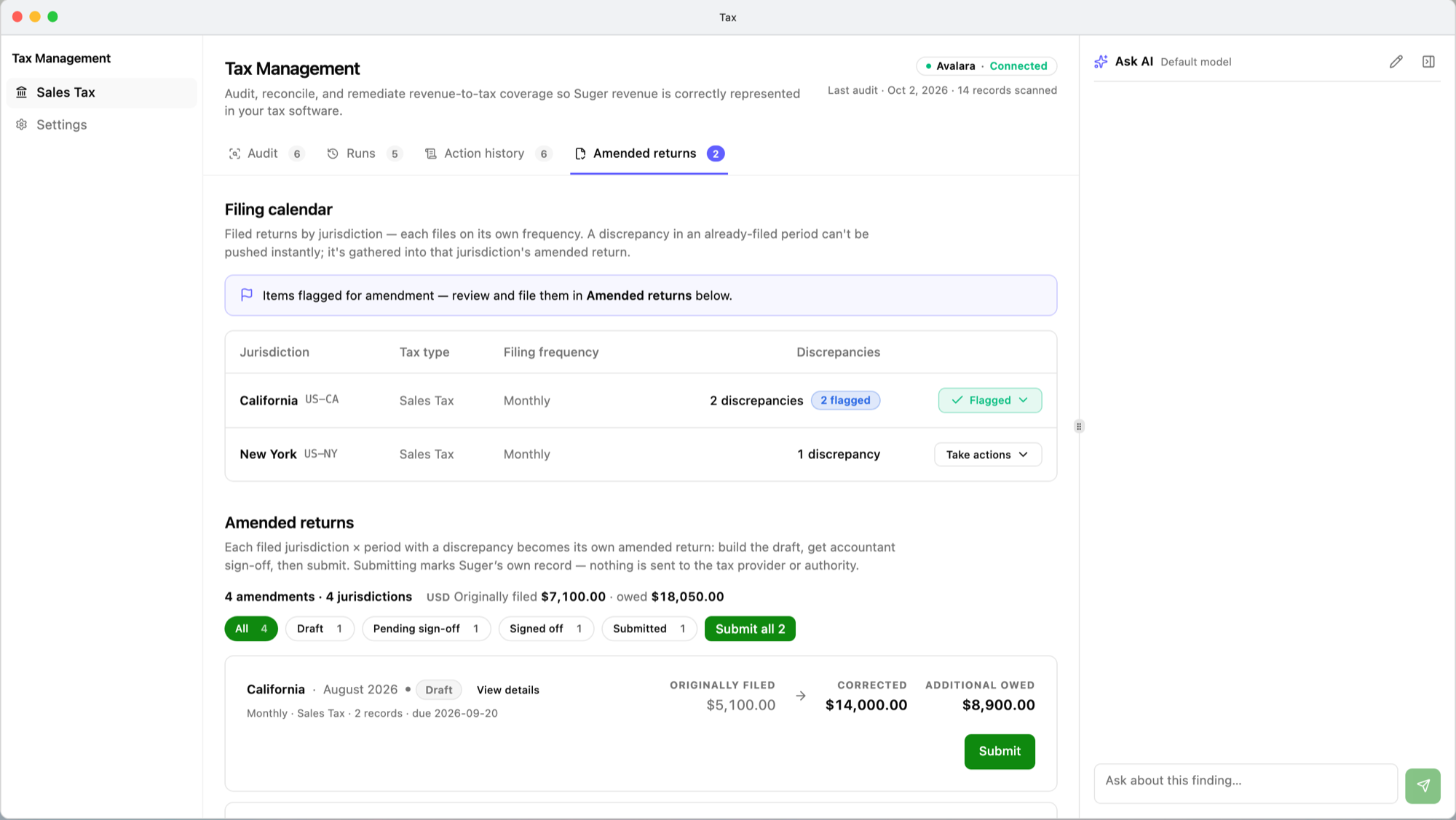
| Column | Shows |
|---|---|
| Jurisdiction | The jurisdiction and its code, such as US-CA. |
| Tax type | Sales Tax, VAT, GST/HST, GST, or Consumption Tax. |
| Filing frequency | From your tax registrations; Unknown when the stored value is not valid. |
| Discrepancies | How many discrepancies, and how many are already flagged. |
The button on each row — Take actions, Flagged, or Submitted, by how far its discrepancies have got — expands the row. Each discrepancy reads Recorded (what the provider has) → should be (what Fours has), with the amount still owed when the correct figure is higher. Review → opens the finding so you can flag it.
The calendar draws on completed audit runs — the latest run’s verdict wins when several cover the same invoice — and on the 50 most recent runs only, so discrepancies found only by older runs don’t appear.
Take a return to submitted
Below the calendar, Amended returns lists one card per jurisdiction and period, filterable by status. Each card shows the jurisdiction, period, and status; the filing frequency, tax type, number of records, and the due date; and three figures: Originally filed, Corrected, and Additional owed. View details opens the return on its own page.
- Request sign-off (optional). The member who created the return selects Request sign-off first, chooses an approver in Send to — any other current member of the organization — and selects Send for sign-off. The return must hold at least one record. It becomes Pending sign-off.
- Sign off. Only the named approver sees Approve & sign off; they can add an optional Sign-off note and confirm. Everyone else sees that the return is waiting on that person. The return becomes Signed off and records who signed off, when, and the note.
- Submit. Select Submit on a Draft or Signed off return that has at least one record, or Submit all to submit every such return at once. A return waiting for sign-off is not submitted. The card then reads “Submitted — recorded in Fours (nothing sent to the provider or authority).”
- File the amendment yourself with your tax provider or the authority.
Who can do what. Flagging, requesting sign-off, and submitting need the Admin or Editor role. Signing off needs no particular role — only being the approver named on that return. Sign-off is optional: an Admin or Editor can submit a draft directly.
KPI calculation formulas
The same formulas apply to findings from every audited channel — AWS, Azure, GCP, and Snowflake. All money figures are taxable amounts (revenue excluding tax, as defined in What an audit reads), not tax: Additional owed is additional taxable revenue to declare, not the tax due on it.
| KPI | Applies to | Formula | Calculation details |
|---|---|---|---|
| Originally filed (per return) | AWS, Azure, GCP, Snowflake | sum of the taxable amounts in the provider records for the return's findings | An Uncovered finding has no provider record and contributes 0. Copied from each finding when it was flagged; in the return’s single currency. |
| Corrected (per return) | AWS, Azure, GCP, Snowflake | sum of the taxable amounts Fours holds for the return's findings | Copied when flagged; the return’s currency. |
| Additional owed (per return) | AWS, Azure, GCP, Snowflake | Corrected − Originally filed | Can be negative when more was filed than Fours holds. Exact decimal arithmetic. |
| Discrepancy line (Recorded … → should be … · +… owed, filing calendar) | AWS, Azure, GCP, Snowflake | owed = Fours' taxable amount − provider's taxable amount | Shown only when positive. |
| Discrepancies and flagged counts (filing calendar) | AWS, Azure, GCP, Snowflake | number of filed-period discrepancies in the jurisdiction; number of them already flagged | Uncovered, Ambiguous, and Needs review findings in filed periods, across the completed runs among the 50 most recent. |
| Summary line (N amendments · N jurisdictions, then Originally filed … · owed … per currency) | AWS, Azure, GCP, Snowflake | amendments = returns shown; jurisdictions = distinct jurisdictions among them; Originally filed = sum of Originally filed; owed = sum of each return's Additional owed, counting a negative one as 0 | Only the returns visible under the current status filter. One segment per currency; currencies are never added together. Because negative amounts count as 0, owed can be higher than the sum of the cards’ Additional owed. |
| Status filter counts (All, Draft, Pending sign-off, Signed off, Submitted) | AWS, Azure, GCP, Snowflake | number of returns with that status | — |
| Submit all N | AWS, Azure, GCP, Snowflake | number of Draft and Signed off returns with at least one record | Counts all returns, whatever status filter is selected. |
| Amended returns tab badge | AWS, Azure, GCP, Snowflake | number of Draft + Pending sign-off returns | — |
Related
- Audits and findings — where filed-period findings come from.
- Corrections — fixing findings in open periods.
- Set up Tax — setting each jurisdiction’s filing frequency.
Spotted something wrong or out of date on this page? Tell us and we'll correct it.