Co-sell Agent
The Co-sell Agent is a built-in AI agent that works your co-sell pipeline. It reads your referrals in Fours, researches each deal in your CRM, calls and documents, and recommends what to do next. What it recommends depends on the skills you turn on. One skill strengthens weak referrals so AWS assigns a rep. Others can suggest the next action on the same pipeline. Every recommendation waits for a person to approve it, unless you choose otherwise.
How it works
The agent runs the same loop for every skill:
- Find the work. Each skill looks across your co-sell referrals for the ones it can help with. Each skill has its own criteria.
- Gather facts. The agent researches each deal in the sources you gave it: the linked CRM record, its contacts and account, call recordings, and your knowledge bases.
- Recommend. The skill turns what the agent found into a recommendation on the referral. Each recommendation lists the sources behind it. When a fact the agent needs is missing, it tells you what is missing instead of inventing it.
- You decide. A person approves or rejects each recommendation. Only an approved recommendation is acted on. In Auto approval, some changes are saved without waiting.
Because every skill works the same pipeline and goes through the same approval, you can turn skills on and off without changing how your team reviews the agent’s work.
Skills
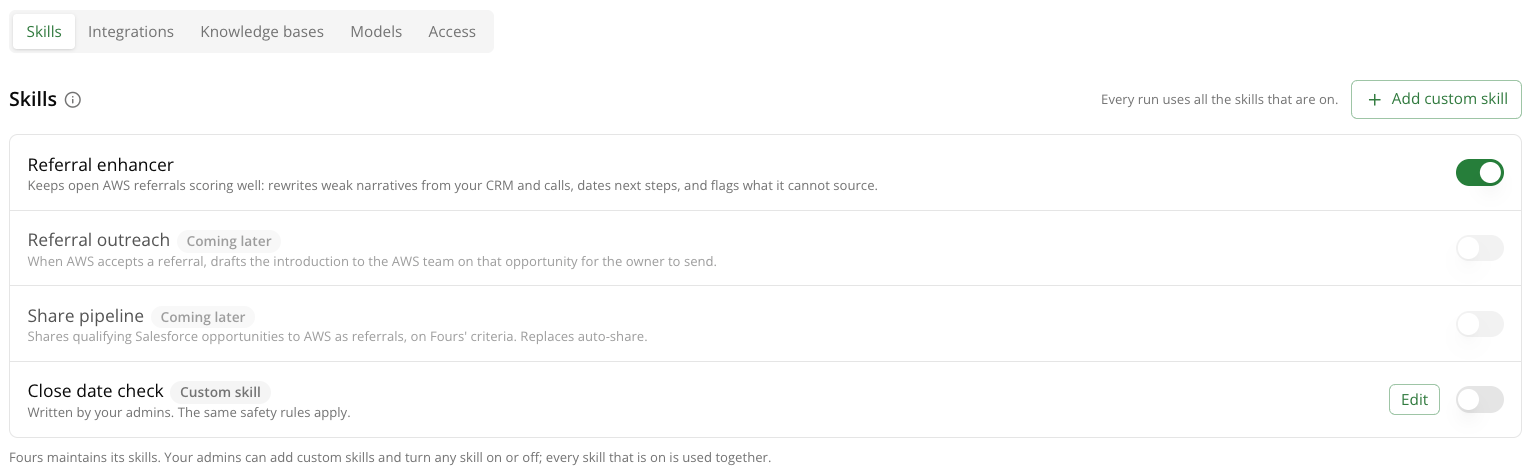
A skill is a set of instructions for one job on your co-sell pipeline. Every run uses all the skills that are on. Fours maintains the standard skills, and your admins can add custom ones. Turn any skill on or off in the Skills tab of the agent’s settings.
| Skill | What it recommends | Status |
|---|---|---|
| Referral enhancer | Rewrites of weak AWS referrals, sourced from your CRM and calls, so AWS is more likely to assign a rep. | Available |
| Referral outreach | When AWS accepts a referral, the introduction email to the AWS team on that opportunity, for the owner to send. | Coming later |
| Share pipeline | Which qualifying Salesforce opportunities to share to AWS as referrals. Replaces auto-share. | Coming later |
| Custom skills | New jobs your admins write, or your own version of a standard skill, using the agent’s existing access. | Available |
Referral enhancer
Referral enhancer keeps open AWS referrals scoring well. It rewrites weak business problems and next steps from your CRM and calls, dates next steps, and flags what it cannot source.
Which referrals it works. Open AWS outbound referrals that meet all of these conditions:
- The co-sell motion is Agent-engaged. Partner-led and AWS Field-engaged referrals are skipped.
- The target close date is in the future.
- The AWS quality score is under 70.
- Nobody rejected a proposal on it in the last 14 days.
- The agent did not update it in the last 48 hours, so AWS has time to re-score it.
- The skill has tried it fewer than 3 times.
It works failed updates first, then the largest expected customer spend, then the earliest close date.
What it writes. Every customer fact needs a source. It never names other clouds, and never includes pricing, discounts or deal tactics. It does not change fields your deal team set, such as the AWS ask, contacts and competitors. It checks each draft with the AWS quality score prediction, and the proposal shows the score AWS is expected to give next to the score today.
When it leaves a referral alone. If AWS set the co-sell motion by a business rule, editing the referral won’t get a rep assigned, so the skill skips it.
Custom skills
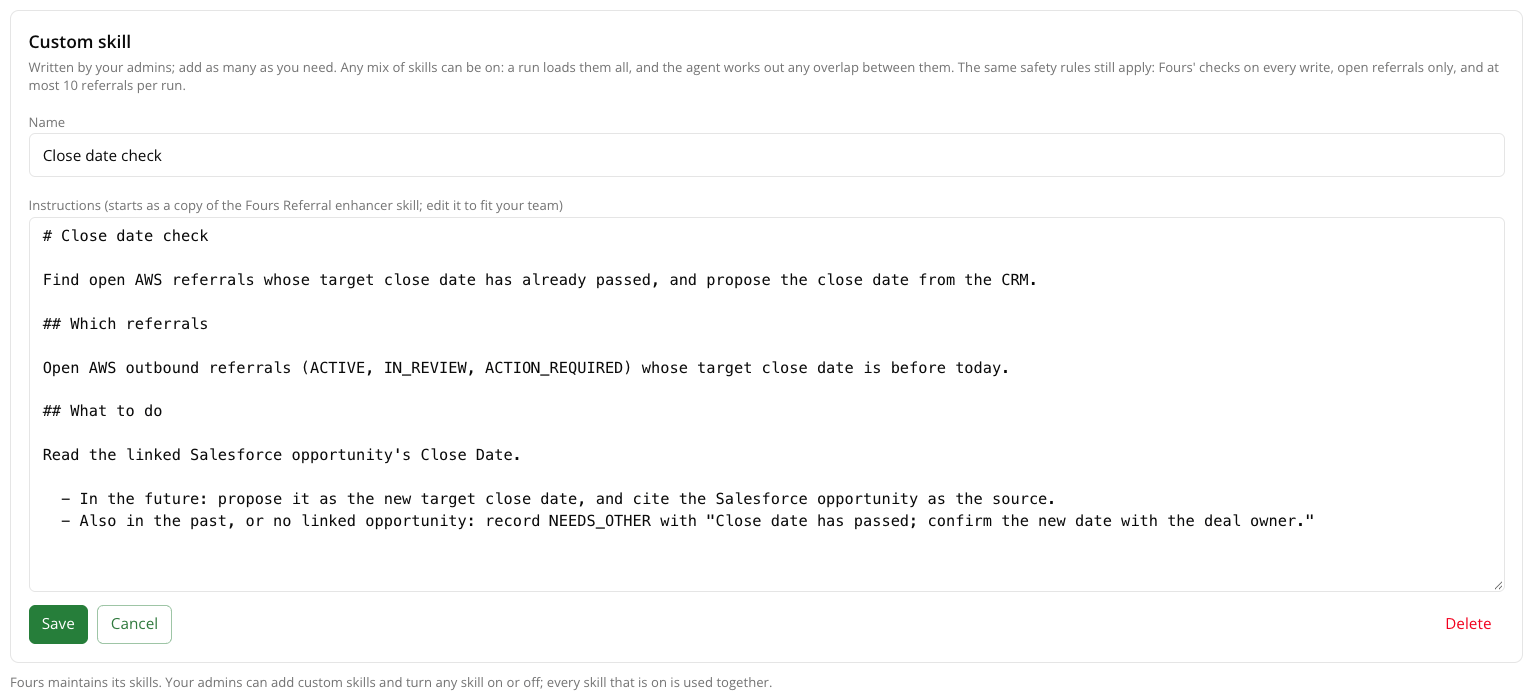
A custom skill is a name plus written instructions. Your admins write it in the Skills tab with Add custom skill. The instructions start as a copy of Referral enhancer, so you can edit that or replace it. While the skill is on, the agent follows it on every run and in every chat.
Custom skills add to the standard skills. They don’t replace them. Every skill that is on runs, so there are two ways to use a custom skill:
| You want to | Do this |
|---|---|
| Add a new job | Write a custom skill and turn it on next to the standard ones. It finds its own referrals and makes its own recommendations. For example, propose a new close date for referrals whose close date has passed. |
| Change how a standard skill works | Start a custom skill from a copy of that skill’s instructions, edit it, and turn the standard skill off. For example, a version of Referral enhancer that skips renewals or orders referrals differently. |
What a custom skill can do:
- Add a new job on your co-sell pipeline, with its own criteria for which referrals to work.
- Replace a standard skill with your own version: different criteria, a different order, or your house style for business problems.
- Point the agent at your own sources. For example, tell it which knowledge base holds account plans.
What a custom skill cannot do:
- Give the agent new tools or access. A skill can only use the integrations, knowledge bases and Fours co-sell actions the agent already has.
- Read other Fours data. The agent’s Fours access is limited to co-sell referrals, so a skill can’t pull in contacts, offers or entitlements.
- Skip approval. In Manual mode, every change a custom skill makes is still a proposal.
- Run on its own schedule or work more referrals. Custom skills run with the others, on Run now or the nightly run, up to 10 referrals.
Each recommendation records which skill made it, so you can see which skill is doing what.
| Limit | Value |
|---|---|
| Custom skills per organization | 20 |
| Instructions per skill | 20,000 characters |
| Skill name | 200 characters |
Turn it on
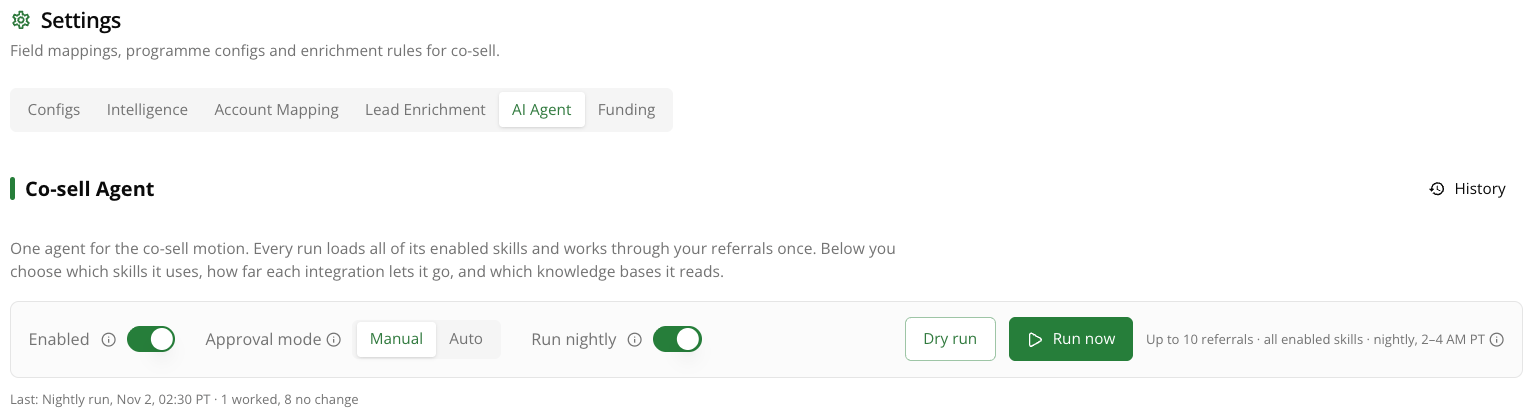
Only organization admins can change the Co-sell Agent’s settings. Open Co-sell › Settings › AI Agent and turn on Enabled. While it is off, nothing runs, and Dry run and Run now are unavailable.
The agent always has access to your co-sell referral data in Fours. Everything else it uses is something you add in its settings:
| Setting | What it controls |
|---|---|
| Approval mode | Whether the agent proposes changes for approval (Manual) or saves some of them directly (Auto). See Approval mode. |
| Run nightly | Runs the agent every night. Off by default. See Running the agent. |
| Skills | The jobs the agent does on each run. See Skills. |
| Integrations | The systems it reads from and writes to besides Fours, such as Salesforce, HubSpot, Gong and Slack. See Integrations. |
| Knowledge bases | Documents it searches for context and sources, such as call notes or account plans. Manage them in Knowledge Bases. |
| Model | The AI model the agent runs on. The Fours hosted model is the default. You can pick one of your org’s connected models to run on your own provider. |
| Access | Who besides org admins can run and chat with the agent. See Who can use it. |
Every change to these settings is kept in Co-sell Agent Settings Update History.
Approval mode
| Mode | What happens |
|---|---|
| Manual (default) | The agent only proposes changes. A person approves each one on the referral. Nothing is saved until then. |
| Auto | The agent saves changes directly to deals that have no AWS rep yet. Deals an AWS rep is already working still wait for approval. |
Start in Manual. Switch to Auto once your team trusts the recommendations.
Fours does not let the agent write to a referral whose linked CRM record a person edited in the last 24 hours. The agent skips those referrals and picks them up on a later run.
Running the agent
| Action | What it does |
|---|---|
| Dry run | Shows which referrals a run would work, and changes nothing. It usually takes one to three minutes. |
| Run now | Works up to 10 referrals with every skill that is on, one AI turn per referral. It takes a few minutes. |
| Run nightly | Runs the same job as Run now every night between 2 and 4 AM Pacific. Each nightly run acts as the admin who turned it on. |
Run nightly is off by default, so the agent spends AI credit only when someone clicks Run now. See Insulin billing for how AI credit is metered. History › Runs lists each run and what it did.
Review recommendations
Each referral the agent worked shows a Co-sell Agent panel with its recommendations:
| Status | Meaning |
|---|---|
| Pending approval | A recommendation is waiting for approval. |
| Applied | The change was saved and sent to AWS, and AWS has not responded yet. |
| Outcome | AWS changed the referral after the update, such as its score or co-sell motion. |
| Needs you | The agent needs something it could not source, such as a dated next step, a contact or an address. |
| Rejected | Someone rejected the recommendation. |
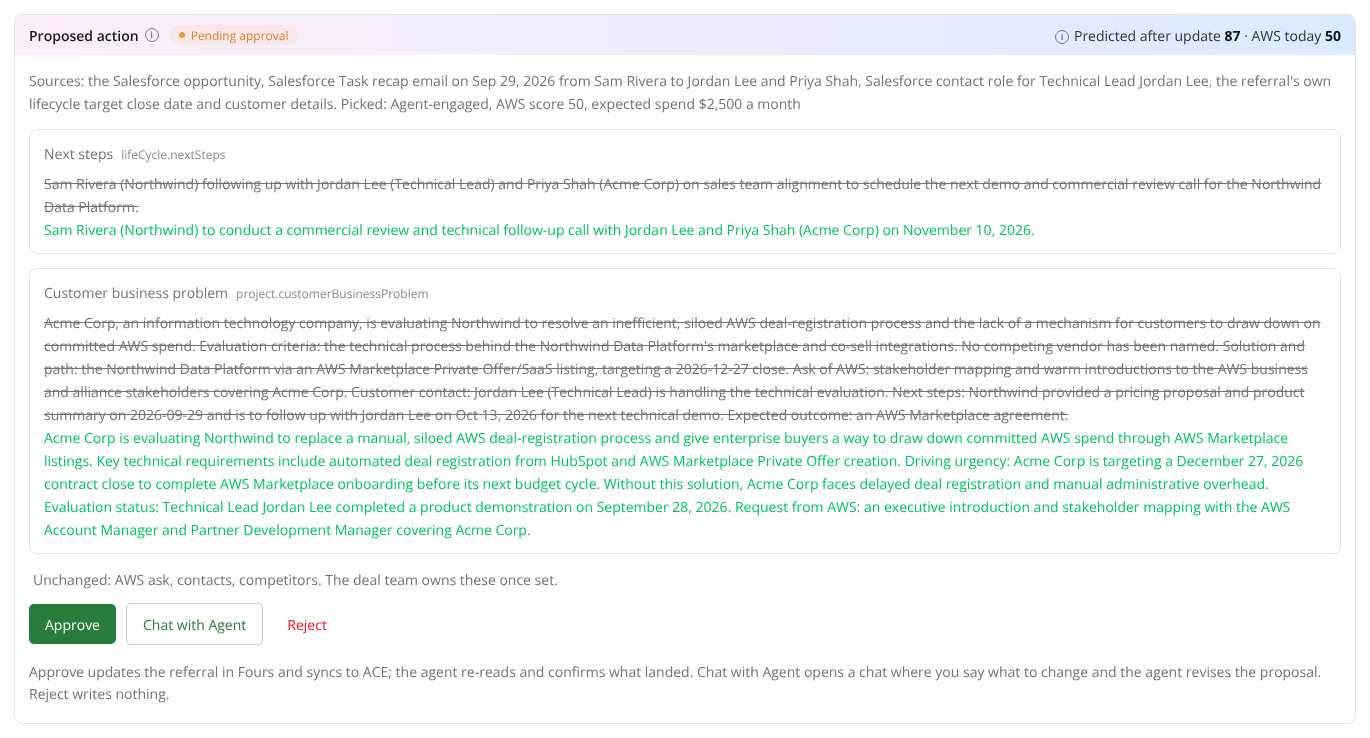
A recommendation shows what it would change, the sources behind each change, and which skill made it. For Referral enhancer, it also shows the score AWS is expected to give after the update, next to the score today.
You have three choices:
- Approve saves the change in Fours and syncs it to AWS. The agent then re-reads the referral to confirm what landed.
- Chat with Agent opens a chat about this recommendation. Say what to change, and the agent revises the proposal.
- Reject writes nothing. You can add a reason, such as “the next step is wrong”. Referral enhancer then leaves that referral alone for 14 days.
Referral enhancer tries each referral up to 3 times. The panel shows which attempt you are looking at.
Chat with the agent
Use Chat with Agent on the co-sell referral list or on a referral to ask the agent questions. For example:
- “Which referrals need attention?”
- “What did the last run do?”
- “Which have no dated next step?”
- “Why this change?” or “Shorten the business problem”
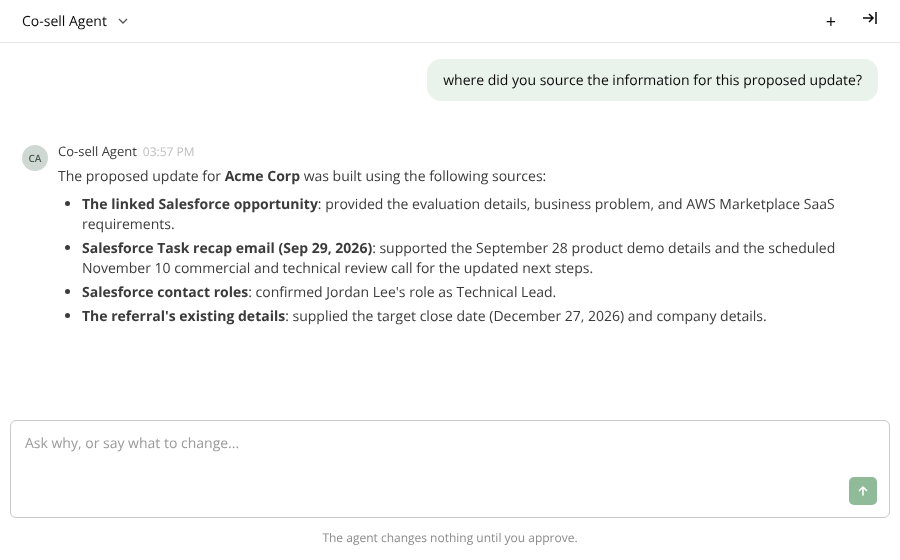
In a chat, the agent asks you to confirm in a dialog before it approves, rejects or resets anything for you, and before it posts to Slack.
Integrations
Integrations are the systems the agent uses besides Fours. You can add any integration your org has connected, such as Salesforce, HubSpot, Dynamics 365, Gong, Slack or Datadog. If an integration you need is missing, connect it first in Integrations.
Each integration you add gets Edit access by default, so the agent can read from it and write to it. You can change it back to Read-only at any time. Each integration offers only the access levels its actions support:
| Access | What the agent can do |
|---|---|
| Read-only | Read records, such as opportunities, deals, contacts and call transcripts. |
| Edit | Read, and also create and update records. This is the default. |
| Full | Edit, and also delete records. |
Slack is only for posting. On Edit, the agent can post a message from a chat after asking you. It never reads your Slack channels. On Read-only, it gets no Slack access at all.
Who can use it
| Who | What they can do |
|---|---|
| Org admins | Change settings, run the agent, and chat with it. |
| People given Editor or Admin on the Access tab | Run the agent and chat with it. |
Co-sell Agent and Insulin
The Co-sell Agent is an organization-level agent. It lives in the co-sell area and works only on co-sell. Insulin is your general assistant everywhere else in Fours. To work co-sell referrals from your own AI tools instead, see Co-Sell with AI (MCP).
FAQ
Does the agent send anything to AWS without approval? Not in Manual mode. In Auto mode, it saves changes only to deals with no AWS rep yet. Deals an AWS rep is working always wait for approval.
Can it make things up? No. Every recommendation lists its sources. When a fact is missing, the agent asks you for it instead of guessing.
Why didn’t it work a referral? Each skill has its own criteria, so check the skill’s section above. For every skill, Fours also blocks writes to a referral whose CRM record a person edited in the last 24 hours, so the agent picks it up on a later run.
What does it cost? The agent uses AI credit for each referral it works, on Run now, nightly runs and chats. More skills on means more work per referral. See Insulin billing.
Spotted something wrong or out of date on this page? Tell us and we'll correct it.