ACE Eligibility
Become ACE eligible so you can co-sell with AWS and receive referrals through the APN Customer Engagement (ACE) Program.
Overview
The AWS Partner Network (APN) Customer Engagement (ACE) Program helps AWS Partners support customers and drive successful engagements on AWS. Qualifying partners who have demonstrated their ability to drive customer engagements on AWS become eligible to receive:
- Leads — referrals of inbound prospects generated by AWS.
- Opportunities — pre-qualified opportunities with AWS customers or potential AWS customers.
The ACE Program also gives AWS Partners access to sales opportunities, funding options, and more. The goal for co-selling with AWS is to get into ISV Accelerate, which can open up new opportunities and strengthen your partnership with AWS.
Check whether you are already ACE eligible
If you believe you are already ACE eligible, you can verify it:
- Sign in to AWS Partner Central.
- Scroll to the AWS Partner Paths section.
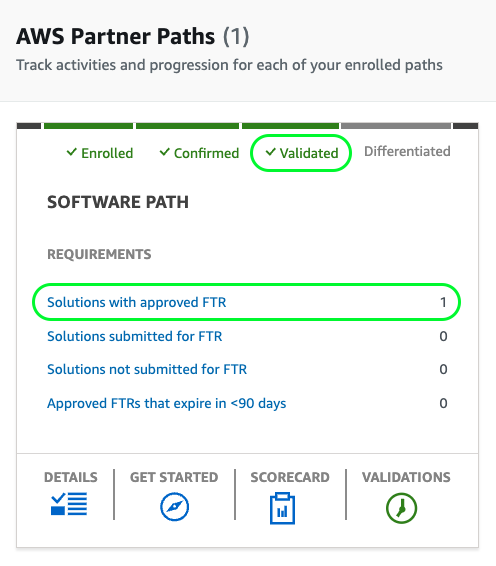
- Confirm that your Software Path is Validated and shows a Solution with an approved FTR.
If you are not ACE eligible yet, follow the steps below.
Necessary Team Members
During the process, the following roles are crucial:
- APN Admin — logs in to AWS Partner Central and grants permission to the necessary team members.
- Technical Manager — provides information for the Foundational Technical Review (FTR) and submits it.
- Sales team member — provides information about the opportunities submitted for validation in AWS Partner Central.
Steps to Become ACE Eligible
Step 1: Join the AWS Partner Network (APN)
Create an AWS Partner Network (APN) account. Make sure the Alliance lead is the person creating this account — the Alliance lead will be the primary owner of the APN account.
Step 2: Enroll in the AWS Software Partner Path
Once registered with the AWS Partner Network, enroll in the Software Partner Path.
Step 3: Create a Partner Solutions Finder listing
Create your listing through AWS Partner Central → My Company → Company Profile.
Step 4: Accept ACE terms and conditions
You must accept the AWS terms and conditions to co-sell with AWS and access APN programs and benefits:
- Navigate to the Home page in AWS Partner Central and scroll down.
- Review and accept the terms when prompted.
You can review the terms in advance at AWS Partner terms and conditions.
Step 5: Pay the APN membership fee
Pay the APN Program fee via your company’s designated AWS account.
- Log in to your company’s AWS account Billing and Cost Management console.
- In the navigation panel, choose Payments.
- In the Payments due table, select the invoice you want to pay and choose Complete payment.
- On the Complete a Payment page, your default payment method is selected if it is eligible to pay the invoice.
- To use a different payment method or choose an eligible one, choose Change.
- Confirm that the summary matches what you want to pay, and choose Verify and pay.
- After your bank processes the payment, you are redirected to the Payments page.
Step 6: Share at least 10 sales opportunities
All AWS Partners must submit at least 10 opportunities and get them validated by the AWS team. Follow these steps:
- Log in to AWS Partner Central.
- Click the Sell tab.
- Choose Opportunity Management.
- Click Create, or use the Bulk option to bulk import all the opportunities.
- Submit the opportunities.
- Get at least 10 opportunities validated and accepted by AWS.
To bulk import opportunities:
- Click Bulk imports, scroll to the bottom, and click Start Import.
- Download the Excel template, fill in the relevant information, and import it.
- Once you have submitted the 10 opportunities, wait until the Status = Approved.
- Once the 10 submitted opportunities are approved, qualify them by updating the Stage field to Qualified.
Step 7: Submit a Foundational Technical Review (FTR)
What is an FTR? A Foundational Technical Review on AWS assesses the architecture, security, and performance of your cloud infrastructure. It ensures your AWS environment follows best practices, meets security standards, and is optimized for performance and cost. Addressing any gaps in these areas helps you build a solid foundation for your AWS deployments and mitigate operational risks.
Prerequisites
Checked automatically in Partner Central under the Validation tab on your Solution:
- The solution is linked to exactly one AWS Marketplace product
- The linked product is a software type (SaaS, AMI, Container, or Machine Learning), Professional Services and other non-software types aren’t eligible
- The product has an approved, AWS-hosted architecture (upload an architecture diagram in AWS Marketplace Management Portal if you haven’t)
- The product has Partner Revenue Measurement (PRM) enabled. This can take up to 7 days to reflect after you turn it on, so enable it early
How to complete the FTR:
- Sign in to AWS Partner Central.
- Navigate to Build → Solutions, then choose your solution.
- Go to the Validation tab and confirm all prerequisites show Complete.
- Choose Request validation.
- For Report type, select either SOC 2 report or WAFR report:
- SOC 2 Type II report — must be less than 1 year old, with an unqualified auditor opinion, AWS infrastructure explicitly in scope, and Security and Availability trust criteria included
- AWS Well-Architected Framework Review (WAFR) — must be less than 1 year old, with zero high-risk issues in the Security, Operational Excellence, and Reliability pillars, and your solution referenced by name
- Upload your report (PDF, 3 MB max).
- Choose Request FTR.
Your submission is reviewed automatically and returns approval or specific remediation feedback within minutes. If action is required, resolve the flagged issues and choose Resubmit, you can resubmit as many times as needed.
Once approved, the FTR is valid for 2 years. The Validation tab shows your expiration date, plan to resubmit before it lapses to keep your badge and program eligibility active.
Step 8: Check your Software Partner Path
Once you have completed the steps above, check your Software Partner Path. Make sure it is in Validated status and shows 1 Solution with an approved FTR.
Step 9: Confirm with the AWS Partner Development team
Finally, connect with the AWS Partner Development team to sign off on all completed requirements.
Track ISV Accelerate readiness in Fours
Once you are ACE eligible, the next goal is AWS’s ISV Accelerate program. You don’t apply for it: AWS sends you an invitation once you meet all eight of its requirements. To see where you stand, open Co-Sell › Insights › AWS programs in the Fours Console. The tab appears when your organization has an AWS Marketplace or AWS ACE integration.
The tab groups AWS’s eight requirements, worded as AWS words them, into three tiles. Pick a tile to see its requirements and what to do next.
| Tile | Requirements | Who checks them |
|---|---|---|
| AWS Marketplace listing | One or more software products listed as general availability in AWS Marketplace | Fours, from your AWS Marketplace data |
| Co-sell pipeline | At least 5 launched opportunities (ACE or AWS Marketplace private offers) in the past 12 months, and at least 15 qualified opportunities in ACE in the past 12 months, neither For Visibility Only | Fours, from your ACE and AWS Marketplace data |
| AWS Partner Central | ACE program eligibility; Validated or Differentiated status; an Amazon Payee Central account; at least one person who completed the Co-Selling with AWS learning module; at least $2,000 in recognized AWS Account revenue at enrollment | You, in AWS Partner Central or AWS Skill Builder. Each row reads Check in AWS and links there. |
Fours updates its three checks every few hours. Each requirement shows Met or Not met, or Not confirmed or Check in AWS when Fours can’t see it. How Fours counts:
- Listing. A SaaS, AMI or container product with pricing whose visibility in AWS Marketplace is Public. Free, Contact Us, machine learning, professional services and data products don’t count.
- Launched opportunities. ACE opportunities at Launched with Co-Sell involvement, plus private offers a buyer accepted, in the past 12 months. An offer linked to a counted opportunity counts once. Fours dates each opportunity by its last update, so the count is an estimate.
- Qualified opportunities. ACE opportunities AWS approved that are past Prospect and not Closed Lost, with Co-Sell involvement, created in the past 12 months. Fours dates each one by when it was created, so this count is an estimate too.
- For Visibility Only opportunities, and those whose AWS involvement is unknown, never count. Fours shows how many it left out.
- Without AWS ACE connected, Fours counts only accepted private offers toward launched opportunities and can’t count qualified ones.
These are Fours’ ways of counting from your data. AWS decides whether you meet each requirement. Choosing ISV Accelerator Program Partner as the partner type on your AWS ACE integration marks nothing as met: AWS confirms ISV Accelerate membership by email, not through Fours.
Spotted something wrong or out of date on this page? Tell us and we'll correct it.