Creating a Knowledge Base
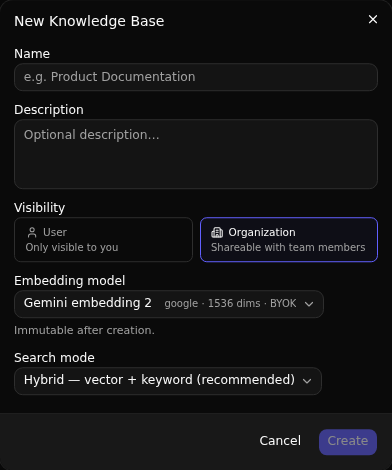
- Click the + button in the Knowledge Bases list (or Create one on the empty state)
- Configure the following:
| Field | Description |
|---|---|
| Name | A descriptive name for the knowledge base |
| Description | Optional summary of what it contains |
| Visibility | User (only visible to you) or Organization (shareable with your team). Creating an organization knowledge base requires org admin access. |
| Embedding model | The model used to index and search documents. The options depend on who owns the knowledge base — see Choosing an embedding model below. |
| Search mode | Hybrid (recommended), Vector only, or Keyword only |
- Click Create
Choosing an embedding model
Every document is embedded with the knowledge base’s embedding model, and searches use that same model. Which models you can pick depends on who owns the knowledge base:
Two kinds of model can appear in the picker, and each has its own condition.
Fours-hosted models — BGE-M3 or Qwen3 Embedding 0.6B — need no key of your own, and BGE-M3 is the default when you don’t pick one. They are offered to either visibility, but only while your organization allows Fours’ platform key (Settings → Organization → AI Gateway → Allow Suger platform key, described in Getting Started). Turn that switch off and the hosted models leave the picker for everyone in the organization.
Your own providers’ models are added for each provider that scope has connected: OpenAI (text-embedding-3-small and -large), Gemini (Gemini embedding 2), OpenRouter (BGE-M3), DeepInfra (BGE-M3, Qwen3 Embedding 0.6B), Fireworks (Nomic Embed v1.5), and Together (multilingual-e5-large-instruct).
- Organization knowledge bases add the providers the organization has connected.
- User (personal) knowledge bases add the providers you have personally connected, never the organization’s.
Each option is labelled with its provider, vector size, and hosting — for example openai · 1536 dims · BYOK or deepinfra · 1024 dims · Suger-hosted.
Embedding is billed like any other AI. Each embedding request a knowledge base makes — indexing a document, and running a search — is charged to your organization’s AI credit, a Fours-hosted model at its price and your own key at the platform fee, and appears as Knowledge base on the Agent tab of the usage breakdown. While AI is paused for billing, indexing fails the document with the reason and searches are refused — see When AI pauses.
Spotted something wrong or out of date on this page? Tell us and we'll correct it.