Using a Knowledge Base with Agents
Agents retrieve context by searching the knowledge bases available to them:
- Custom agents search the knowledge bases explicitly attached to them. In the agent’s create or edit form, the Knowledge Bases section lists eligible knowledge bases as checkboxes — select one or more. A user-level agent can attach your user-level knowledge bases; an org-level agent can attach organization knowledge bases.
- The built-in Insulin assistant searches your own knowledge bases automatically. You can also pick an explicit set — see Choosing which knowledge bases Insulin uses below.
At query time an agent can search up to three knowledge bases and cites the source document for each result. See Agents for how to create and configure custom agents.
Choosing which knowledge bases Insulin uses
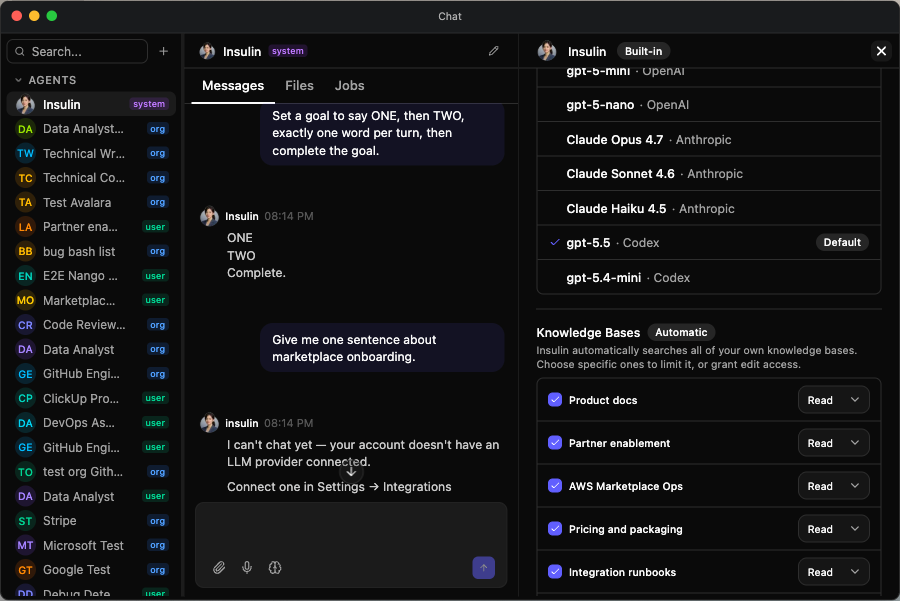
Open Chat, select the Insulin agent, and click the pencil button in the conversation header (labelled Insulin model settings). Its Knowledge Bases section controls what Insulin can search.
By default the section shows an Automatic badge and Insulin searches every knowledge base you own, read-only. Ticking or unticking any row switches to an explicit selection, which then takes over completely:
| Selection | What Insulin searches |
|---|---|
| Automatic (default) | Every knowledge base you own, read-only |
| One or more ticked | Exactly the ticked knowledge bases |
| Nothing ticked | No knowledge base at all |
The list covers every knowledge base you can reach — the ones you own, plus organization knowledge bases shared with you, each marked with a Shared badge. The built-in Insulin assistant never searches an organization knowledge base, even one you tick, so grounding answers in organization content still needs a custom agent that has it attached.
Each ticked row also carries an access mode, Read or Edit, with the same meaning as for a custom agent (see Agents). Choosing Edit only expresses intent: Fours re-checks your own role on that knowledge base immediately before every write, so picking Edit on one you can only read grants you nothing, and access revoked mid-conversation stops the next write.
Select Reset to automatic to discard the selection and go back to the default.
Spotted something wrong or out of date on this page? Tell us and we'll correct it.