# Metering
Track, report, and aggregate customer usage so Fours can bill it accurately across AWS, Azure, GCP, and Oracle.
---
## Overview
After an entitlement is created, you report metric usage data to Fours in real time. Fours normalizes usage reporting across AWS, Azure, Google Cloud Platform (GCP), and Oracle Cloud Marketplace (OCI), so your team doesn't have to maintain a separate billing API for each marketplace. This helps you prevent revenue leakage and stay compliant with contract terms.
Fours aggregates the reported data hourly and daily. When the billing cycle is over, Fours aggregates the total quantity of each billable dimension for the period, calculates the amount of each billable dimension from the aggregated data and the price model of the billable metric, and uses the total to generate the invoice.
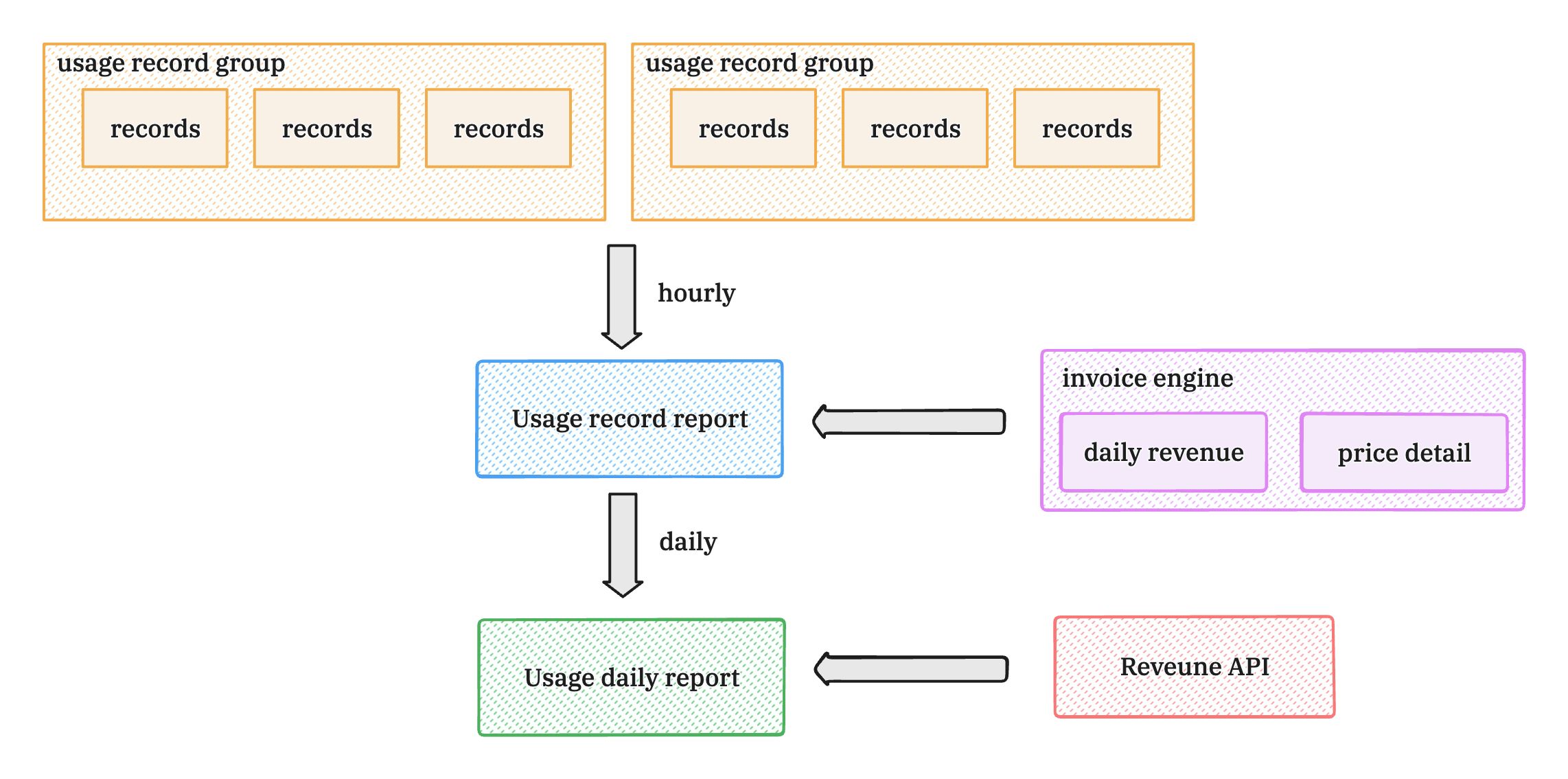 You can report usage in several ways:
- **Fours Metering API** — stream usage from your own backend services.
- **Native billing integrations** — connect Metronome, Orb, Lago, or Chargebee to route usage automatically.
- **Console reporting** — report a single event manually or batch-upload a CSV.
The reported usage data can be viewed on the entitlement details page in real time. To give a customer credit against its usage-based charges, see [Usage Credit](/metering/usage-credit/).
You can report usage in several ways:
- **Fours Metering API** — stream usage from your own backend services.
- **Native billing integrations** — connect Metronome, Orb, Lago, or Chargebee to route usage automatically.
- **Console reporting** — report a single event manually or batch-upload a CSV.
The reported usage data can be viewed on the entitlement details page in real time. To give a customer credit against its usage-based charges, see [Usage Credit](/metering/usage-credit/).
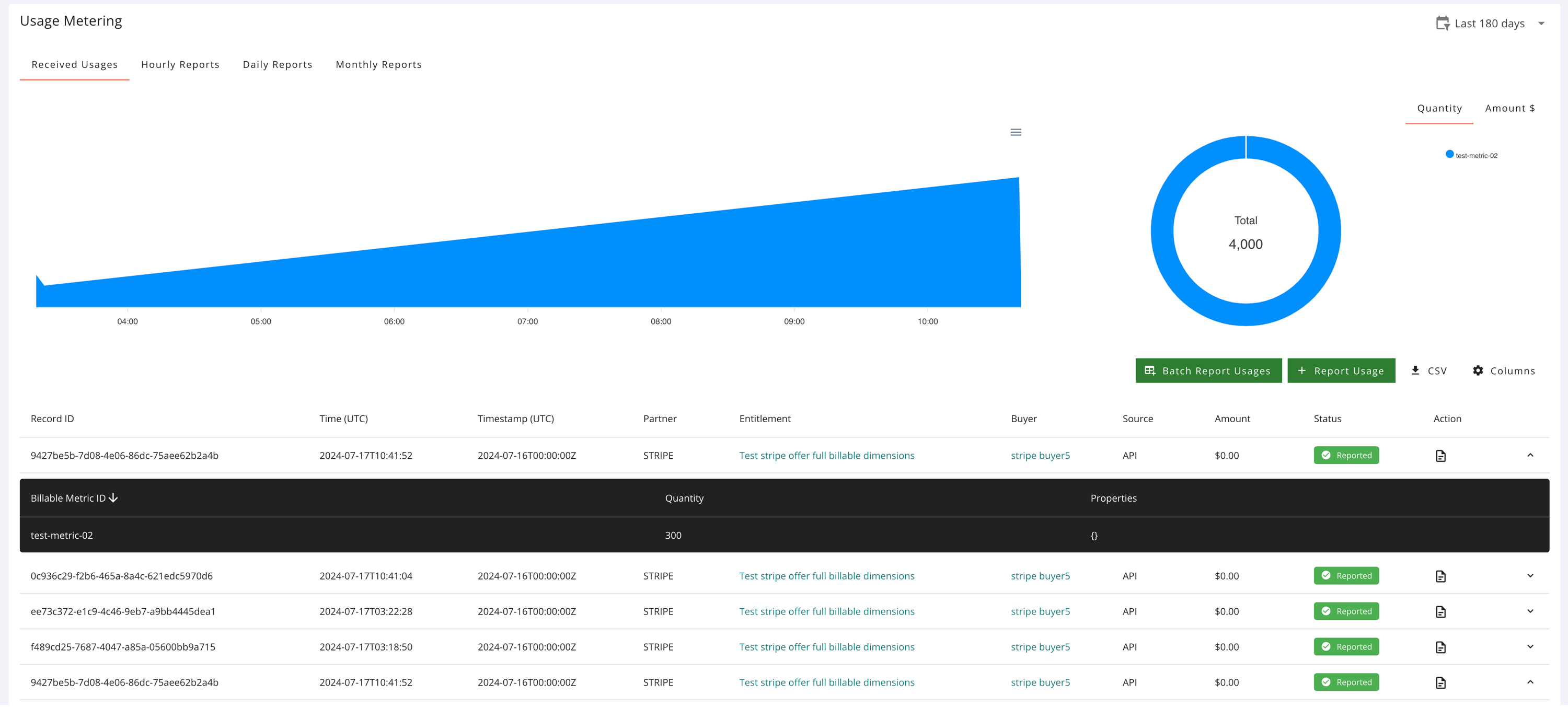 ## Report usage with the Fours Metering API
To report usage for an active buyer contract, your backend services submit a `POST` request to the Fours Metering API. Fours validates, aggregates, and forwards the records to the respective cloud provider in the format each platform requires.
Use the following APIs to report usage data:
- [report usageRecordGroup](https://doc.fours.com/api/report-usage-record-group/)
- [batch report usageRecordGroup](https://doc.fours.com/api/batch-report-usage-record-groups/)
A request carries its usage in one of two forms, never both:
- **`records`** (v1) — a map from a marketplace usage-metering dimension to a quantity. This is the form
[Usage Metering](/metering/usage-metering/) walks through.
- **`billableRecords`** (v2) — one object per Fours billable metric, keyed by the billable metric's id.
Request body example, in the `billableRecords` form:
```json
{
"id": "0f8b5c2e-4d7a-4b1e-9c3a-6e2d1f0a7b95",
"organizationID": "your-suger-org-id",
"entitlementID": "your-suger-entitlement-id",
"billableRecords": [
{
"key": "billable-metric-id-of-the-entitlements-billable-dimension",
"properties": {
"custom-property-1": "val1",
"custom-property-2": "val2"
},
"quantity": 10
}
]
}
```
- `id` is optional — the UUID of this usage record group, up to 36 characters. If you leave it
out, Fours generates one and returns it in the response.
- `quantity` is the numeric value of the billable metric for this record. Add one object to
`billableRecords` per metric you report.
For the console path and which listing types Fours can meter on your behalf, see
[Usage Metering](/metering/usage-metering/).
:::warning
**Reporting for an Oracle entitlement?** The value you report is the **monetary amount**, not a quantity —
OCI has no dimension catalog and no per-dimension rate, so Fours forwards your value as the charge rather
than multiplying it. Usage keys are also open: any key is accepted without prior configuration. See
[Oracle usage metering](/oracle-marketplace/usage-metering) before you integrate.
:::
- The organizationID and entitlementID are required. Each request can only report one entitlement's usage data.
- The billableRecords is an array, you can report multiple metrics in one request.
- The key is the billable metric id in the entitlement's billable dimension.
- The properties is a map of the custom properties of the billable metric, they are used for filter or group by or unique count.
- The quantity is the number of the metric.
### Enforce idempotency with a unique id
To prevent duplicate billing, always provide a unique `id` in the request body of every metering record.
- Fours uses this identifier to automatically de-duplicate incoming metering events.
- If you submit a payload with an `id` Fours already received for the same entitlement in the last 15 days, Fours rejects the submission with **HTTP 400 Bad Request** and the message *usage record group already reported in the last 15 days*.
### Dimension key and name mapping
In the `records` form, each key you send can be either the marketplace **Usage Metering Dimension Key** or the **Dimension Name**. These values are stored under `WorkloadEntitlement.info.dimensions` for any activated buyer contract, so you can retrieve them there.
### Reporting late usage
Fours does not re-date late usage into the hour it occurred: AWS and Azure receive it in the hour Fours reports it, GCP in an interval reaching back at most three hours, and Oracle with its original timestamps — see [Reporting late usage](/metering/usage-metering/#reporting-late-usage).
## Report usage from the console
Beyond the API, operations and finance teams can track, log, and audit usage directly on the **Usage Metering** page. At the top of the dashboard you can toggle between four views:
- **Received Usages** — raw, individual usage ingest logs as they stream into Fours.
- **Hourly / Daily / Monthly Reports** — aggregated, time-bucketed consumption summaries for reviewing baseline usage and overage trends.
To find specific records in **Received Usages**, type into **Search by Record ID or Invoice ID**. It matches a record's ID and the invoice ID the record carries: a Metronome, Orb, or Stripe invoice ID, a Lago subscription ID, or the **ERP Invoice ID** added when the usage was reported. Separate several IDs with commas to find all of them at once. The download icon exports the rows you found as CSV, with each of those IDs in its own column, so you can reconcile them against the invoice in your billing system. Chargebee invoice IDs are not searched or exported.
### Report a single usage event
For individual corrections or ad-hoc adjustments, enter a usage event manually:
1. Click **+ Report Usage** on the right side of the panel.
2. Enter the details:
- Product
- Entitlement
- Record Date
- (Optional) Additional Metadata
- Usage records
3. Click **Report**.

You can also report a one-off event directly from an entitlement. Open the **Entitlements** tab, choose the entitlement, scroll to the **Usage Metering** section, and specify the record date, usage dimension, and quantity. Make sure the total quantity matches the amount from your internal usage metrics.
### Batch-upload a CSV
If you log usage for many customers at once, upload a single structured CSV to report thousands of entries at a time.
Your CSV needs a header row. The console reads these columns by their exact, case-sensitive names and ignores any
other column:
| Column Header | Requirement | Purpose |
| --- | --- | --- |
| `dimension` | Required | The marketplace usage-metering **Dimension Key** (e.g. `seats`, `data_gb`) — not the Dimension Name. |
| `quantity` | Required | The amount of usage for that dimension. |
| `sugerBuyerId`, `sugerExternalBuyerId`, `customerId`, `sugerEntitlementId` or `sugerExternalEntitlementId` | One of them is required | Identifies the buyer or the entitlement the usage belongs to. |
| `timestamp` | Optional | The ISO 8601 date/time the usage occurred (e.g. `2026-05-29T00:00:00Z`). If blank, the report time is used. |
| `erpInvoiceID` | Optional | An invoice reference from your ERP. Rows for the same entitlement are reported together per `erpInvoiceID`. |
Rows for the same entitlement and `erpInvoiceID` become one usage record group, with the quantities for each dimension
added together. The group takes the `timestamp` of its first row, so upload one period per file. When a buyer holds
more than one active entitlement, identify the entitlement (`sugerEntitlementId` or `sugerExternalEntitlementId`): a
buyer identifier resolves to only one of them.
:::warning
**A CSV upload is not de-duplicated.** Unlike an API request, a row carries no `id` Fours can check, so uploading the
same file twice — or a corrected copy of one you already uploaded — reports its usage again. Upload each period's
usage once.
:::
To upload:
1. Open the **Usage Metering** page from the left-hand console menu.
2. Click **Batch Report Usages** in the upper right.
3. Choose **Upload CSV** in the batch window. You can also turn on the **Auto Fix** toggle: it reports a row whose
dimension the entitlement does not have against the entitlement's first dimension instead of flagging it (Oracle
listings are left as they are).
4. Drag and drop your file into the target, or click to browse.

Once your file lands, Fours validates every row before sending anything to the marketplace:
- **Clean rows** pass validation and are queued for transmission.
- **Flagged rows** are set aside and listed under **Invalid Usage Records** with the reason, so you can fix them; only
the valid rows are reported. If the file has no `dimension` or `quantity` column, or none of the identifier columns,
every row is rejected with _"Invalid usage record; missing dimension, quantity, customerId, sugerBuyerId,
sugerExternalBuyerId, sugerEntitlementId or sugerExternalEntitlementId"_. Otherwise a flagged row carries its own
reason, such as _"buyer is not found"_ or _"usage dimension is not found"_. A blank `quantity` is read as 0, not
flagged.

You can also batch report from an entitlement: create a CSV of multiple usage events across multiple dates, upload it in the entitlement's **Usage Metering** section, and click **Batch Report**.
## Automate usage with billing integrations
Fours offers native, code-free integrations with leading usage-based billing platforms:
- **Metronome** — stream transactional usage metrics to marketplace contracts.
- **Orb** — sync complex, aggregated multi-metric pricing dimensions.
- **Lago** — map open-source metering to compliant marketplace billing entries.
- **Chargebee** — report the metered overage Chargebee has already priced, as an amount, every hour.
- **Fours APIs** — for custom setups, stream consumption straight from your own backend.
Each connector has its own setup guide: see [Billing Integrations](/metering/billing-integrations/).
To connect a platform:
1. Go to [**Settings > Integrations**](https://console.suger.io/settings?tab=integrations) to view the available connectors.
2. Find your billing platform (Metronome, Orb, Lago, or Chargebee) and click **Connect**.
3. Provide the platform's API credentials and complete the field-mapping step to bind your internal billing dimensions to your marketplace dimension keys.
4. Once active, Fours retrieves usage from your billing platform on that connector's schedule — hourly or daily,
depending on the platform (see [Billing Integrations](/metering/billing-integrations/)) — and reports it to the
marketplace.
**Chargebee** reports money rather than units, so it takes a few more steps:
- Its connect dialog asks only for your Chargebee site name and API key. Nothing is reported until you open the card's **Edit** dialog and turn on **Enable Auto Report Usage**, which sets **Billing Mode** to `amount`.
- Every amount arrives on the single key `chargebee`, in the entitlement's currency, and that key has to land on a dimension the entitlement has. Either your product has a dimension keyed or named `chargebee`, or you map it in **Settings > Usage Metering**: edit the row of each marketplace you sell through, turn on **Enable Dimension Mapping**, and map the source dimension key `chargebee` to the dimension you bill overage through (see [Metering dimension conversion](#metering-dimension-conversion)). A record whose key matches no dimension is rejected.
- Enter each buyer's **Chargebee customer ID** on the buyer. Fours syncs only the buyers that carry one.
Fours then reads each linked buyer's priced overage every hour, at 5 minutes past the hour, and the records it creates appear under **Received Usages** with the source `CHARGEBEE`. For how each Chargebee billing window is settled against its invoice, see [Chargebee](/integrations/chargebee/).
:::info
You can run a native integration and the Fours API side by side. For example, use Orb for standard software metric counts while reporting ad-hoc professional-service milestones through direct API calls. If your billing platform has an outage or sync delay, Fours' aggregation layer buffers events and processes them within the allowable marketplace window once the queue flushes.
:::
## Advanced configuration
### Metering dimension conversion
If your internal telemetry uses dimension names that differ from the ones configured in the cloud marketplaces, define **Metering Dimension Conversion** rules to map them automatically. You can also set a multiplier to scale metrics during conversion (for example, converting gigabytes to megabytes).
:::warning
Once a conversion map is enabled for a marketplace, it applies globally to **all** entitlements in that marketplace environment.
:::
### Commit with additional usage metering (Divide Commit)
For contracts where a buyer prepays a large upfront commitment but you still need to track, segment, or cap usage across milestones, use **Commit with additional usage metering** to split an entitlement into sub-terms:
1. Open the transaction details and click **Divide Commit**.
2. Define the start and end dates for each sub-entitlement milestone, then click **Divide**.
3. The parent term splits into independent tracks so your telemetry can meter usage cleanly within each ring-fenced window.
### AWS usage allocation tags
For AWS Marketplace contracts, you can define custom **Usage Allocation Tags** to break out discrete cost categories in your offers.
- Tags use the `usageAllocations` map array, binding quantities to `UsageAllocationTag` key-value pairs.
- Once reported, these allocations propagate to the buyer's **AWS Billing Console**, letting enterprise customers view and reconcile usage charges by cost center, tag, or department.
## Usage hourly report
Fours aggregates each entitlement's reported usage data every hour, giving you a real-time view of usage.
- Every hour, Fours aggregates the reported usage data of the previous hour.
- If the billable metric is configured with filters, the usage data is filtered by those filters.
- After hourly aggregation completes, Fours generates the hourly report and marks the original usage data as reported.
- Hourly reports only aggregate the quantity of metrics based on the metric's aggregation type; they do not calculate the corresponding amount, because the price model needs the total quantity of the whole billing cycle.
### Aggregate logic
The aggregation logic is based on the billable metric's aggregate type, which is set when the billable metric is created.
| Billable metric's aggregate type | Hourly aggregation logic |
| :------------------------------- | :------------------------------------------------------------------------------------ |
| COUNT | The number of report records within the hour |
| UNIQUE COUNT | The unique count of the specified property's values in report records within the hour |
| SUM | The sum of quantity of report records within the hour |
| MAX | The maximum value of quantity of report records within the hour |
| LATEST | The most recent value of quantity of report records within the hour |
### Aggregation with groupby
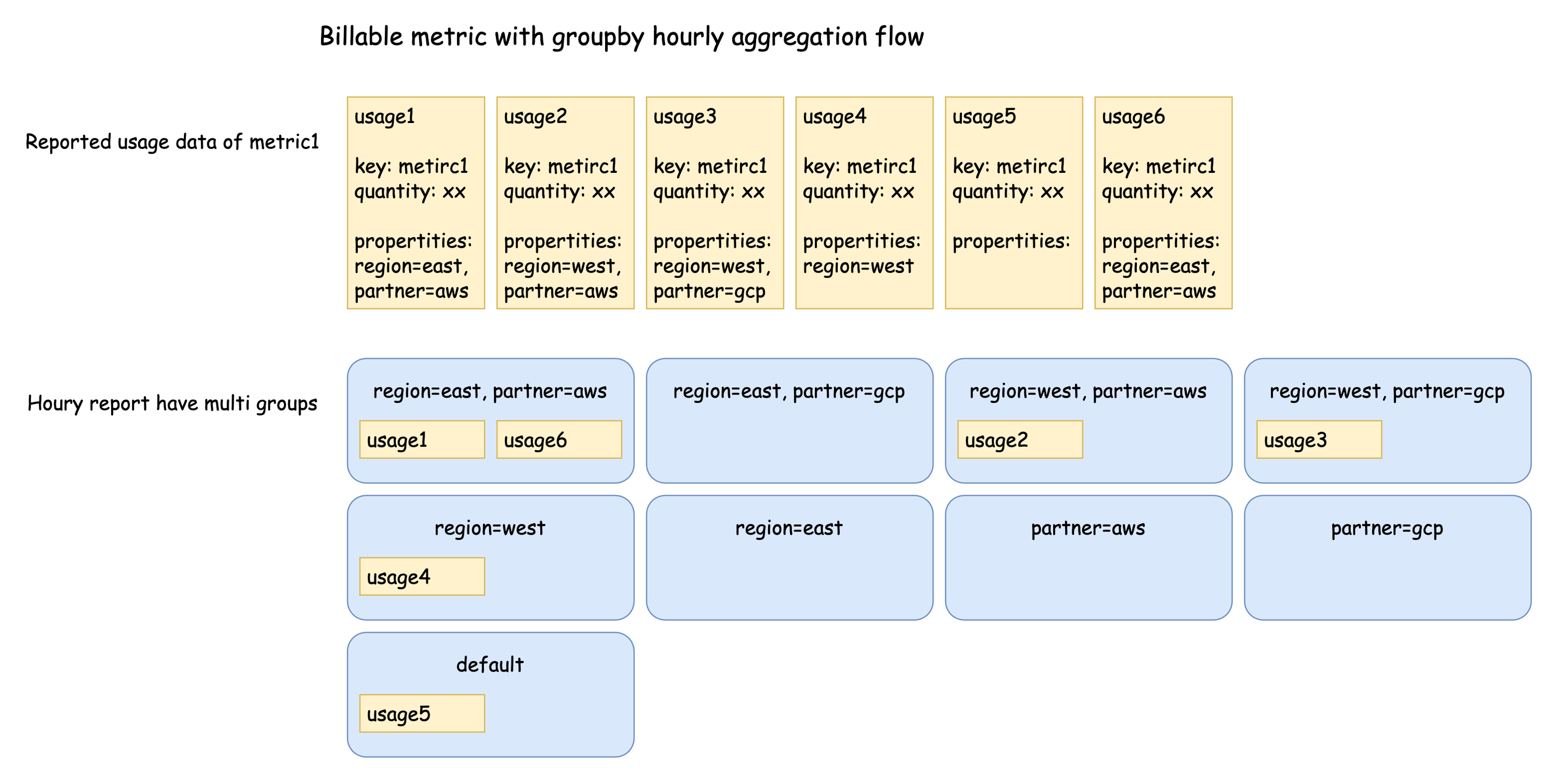
If the billable metric is configured with groupby attributes, the usage records are first divided into multiple groups based on the groupby attributes, then aggregated separately according to the aggregation type.
The reason is that the billable dimension's price model is applied to each group.
## Report usage with the Fours Metering API
To report usage for an active buyer contract, your backend services submit a `POST` request to the Fours Metering API. Fours validates, aggregates, and forwards the records to the respective cloud provider in the format each platform requires.
Use the following APIs to report usage data:
- [report usageRecordGroup](https://doc.fours.com/api/report-usage-record-group/)
- [batch report usageRecordGroup](https://doc.fours.com/api/batch-report-usage-record-groups/)
A request carries its usage in one of two forms, never both:
- **`records`** (v1) — a map from a marketplace usage-metering dimension to a quantity. This is the form
[Usage Metering](/metering/usage-metering/) walks through.
- **`billableRecords`** (v2) — one object per Fours billable metric, keyed by the billable metric's id.
Request body example, in the `billableRecords` form:
```json
{
"id": "0f8b5c2e-4d7a-4b1e-9c3a-6e2d1f0a7b95",
"organizationID": "your-suger-org-id",
"entitlementID": "your-suger-entitlement-id",
"billableRecords": [
{
"key": "billable-metric-id-of-the-entitlements-billable-dimension",
"properties": {
"custom-property-1": "val1",
"custom-property-2": "val2"
},
"quantity": 10
}
]
}
```
- `id` is optional — the UUID of this usage record group, up to 36 characters. If you leave it
out, Fours generates one and returns it in the response.
- `quantity` is the numeric value of the billable metric for this record. Add one object to
`billableRecords` per metric you report.
For the console path and which listing types Fours can meter on your behalf, see
[Usage Metering](/metering/usage-metering/).
:::warning
**Reporting for an Oracle entitlement?** The value you report is the **monetary amount**, not a quantity —
OCI has no dimension catalog and no per-dimension rate, so Fours forwards your value as the charge rather
than multiplying it. Usage keys are also open: any key is accepted without prior configuration. See
[Oracle usage metering](/oracle-marketplace/usage-metering) before you integrate.
:::
- The organizationID and entitlementID are required. Each request can only report one entitlement's usage data.
- The billableRecords is an array, you can report multiple metrics in one request.
- The key is the billable metric id in the entitlement's billable dimension.
- The properties is a map of the custom properties of the billable metric, they are used for filter or group by or unique count.
- The quantity is the number of the metric.
### Enforce idempotency with a unique id
To prevent duplicate billing, always provide a unique `id` in the request body of every metering record.
- Fours uses this identifier to automatically de-duplicate incoming metering events.
- If you submit a payload with an `id` Fours already received for the same entitlement in the last 15 days, Fours rejects the submission with **HTTP 400 Bad Request** and the message *usage record group already reported in the last 15 days*.
### Dimension key and name mapping
In the `records` form, each key you send can be either the marketplace **Usage Metering Dimension Key** or the **Dimension Name**. These values are stored under `WorkloadEntitlement.info.dimensions` for any activated buyer contract, so you can retrieve them there.
### Reporting late usage
Fours does not re-date late usage into the hour it occurred: AWS and Azure receive it in the hour Fours reports it, GCP in an interval reaching back at most three hours, and Oracle with its original timestamps — see [Reporting late usage](/metering/usage-metering/#reporting-late-usage).
## Report usage from the console
Beyond the API, operations and finance teams can track, log, and audit usage directly on the **Usage Metering** page. At the top of the dashboard you can toggle between four views:
- **Received Usages** — raw, individual usage ingest logs as they stream into Fours.
- **Hourly / Daily / Monthly Reports** — aggregated, time-bucketed consumption summaries for reviewing baseline usage and overage trends.
To find specific records in **Received Usages**, type into **Search by Record ID or Invoice ID**. It matches a record's ID and the invoice ID the record carries: a Metronome, Orb, or Stripe invoice ID, a Lago subscription ID, or the **ERP Invoice ID** added when the usage was reported. Separate several IDs with commas to find all of them at once. The download icon exports the rows you found as CSV, with each of those IDs in its own column, so you can reconcile them against the invoice in your billing system. Chargebee invoice IDs are not searched or exported.
### Report a single usage event
For individual corrections or ad-hoc adjustments, enter a usage event manually:
1. Click **+ Report Usage** on the right side of the panel.
2. Enter the details:
- Product
- Entitlement
- Record Date
- (Optional) Additional Metadata
- Usage records
3. Click **Report**.

You can also report a one-off event directly from an entitlement. Open the **Entitlements** tab, choose the entitlement, scroll to the **Usage Metering** section, and specify the record date, usage dimension, and quantity. Make sure the total quantity matches the amount from your internal usage metrics.
### Batch-upload a CSV
If you log usage for many customers at once, upload a single structured CSV to report thousands of entries at a time.
Your CSV needs a header row. The console reads these columns by their exact, case-sensitive names and ignores any
other column:
| Column Header | Requirement | Purpose |
| --- | --- | --- |
| `dimension` | Required | The marketplace usage-metering **Dimension Key** (e.g. `seats`, `data_gb`) — not the Dimension Name. |
| `quantity` | Required | The amount of usage for that dimension. |
| `sugerBuyerId`, `sugerExternalBuyerId`, `customerId`, `sugerEntitlementId` or `sugerExternalEntitlementId` | One of them is required | Identifies the buyer or the entitlement the usage belongs to. |
| `timestamp` | Optional | The ISO 8601 date/time the usage occurred (e.g. `2026-05-29T00:00:00Z`). If blank, the report time is used. |
| `erpInvoiceID` | Optional | An invoice reference from your ERP. Rows for the same entitlement are reported together per `erpInvoiceID`. |
Rows for the same entitlement and `erpInvoiceID` become one usage record group, with the quantities for each dimension
added together. The group takes the `timestamp` of its first row, so upload one period per file. When a buyer holds
more than one active entitlement, identify the entitlement (`sugerEntitlementId` or `sugerExternalEntitlementId`): a
buyer identifier resolves to only one of them.
:::warning
**A CSV upload is not de-duplicated.** Unlike an API request, a row carries no `id` Fours can check, so uploading the
same file twice — or a corrected copy of one you already uploaded — reports its usage again. Upload each period's
usage once.
:::
To upload:
1. Open the **Usage Metering** page from the left-hand console menu.
2. Click **Batch Report Usages** in the upper right.
3. Choose **Upload CSV** in the batch window. You can also turn on the **Auto Fix** toggle: it reports a row whose
dimension the entitlement does not have against the entitlement's first dimension instead of flagging it (Oracle
listings are left as they are).
4. Drag and drop your file into the target, or click to browse.

Once your file lands, Fours validates every row before sending anything to the marketplace:
- **Clean rows** pass validation and are queued for transmission.
- **Flagged rows** are set aside and listed under **Invalid Usage Records** with the reason, so you can fix them; only
the valid rows are reported. If the file has no `dimension` or `quantity` column, or none of the identifier columns,
every row is rejected with _"Invalid usage record; missing dimension, quantity, customerId, sugerBuyerId,
sugerExternalBuyerId, sugerEntitlementId or sugerExternalEntitlementId"_. Otherwise a flagged row carries its own
reason, such as _"buyer is not found"_ or _"usage dimension is not found"_. A blank `quantity` is read as 0, not
flagged.

You can also batch report from an entitlement: create a CSV of multiple usage events across multiple dates, upload it in the entitlement's **Usage Metering** section, and click **Batch Report**.
## Automate usage with billing integrations
Fours offers native, code-free integrations with leading usage-based billing platforms:
- **Metronome** — stream transactional usage metrics to marketplace contracts.
- **Orb** — sync complex, aggregated multi-metric pricing dimensions.
- **Lago** — map open-source metering to compliant marketplace billing entries.
- **Chargebee** — report the metered overage Chargebee has already priced, as an amount, every hour.
- **Fours APIs** — for custom setups, stream consumption straight from your own backend.
Each connector has its own setup guide: see [Billing Integrations](/metering/billing-integrations/).
To connect a platform:
1. Go to [**Settings > Integrations**](https://console.suger.io/settings?tab=integrations) to view the available connectors.
2. Find your billing platform (Metronome, Orb, Lago, or Chargebee) and click **Connect**.
3. Provide the platform's API credentials and complete the field-mapping step to bind your internal billing dimensions to your marketplace dimension keys.
4. Once active, Fours retrieves usage from your billing platform on that connector's schedule — hourly or daily,
depending on the platform (see [Billing Integrations](/metering/billing-integrations/)) — and reports it to the
marketplace.
**Chargebee** reports money rather than units, so it takes a few more steps:
- Its connect dialog asks only for your Chargebee site name and API key. Nothing is reported until you open the card's **Edit** dialog and turn on **Enable Auto Report Usage**, which sets **Billing Mode** to `amount`.
- Every amount arrives on the single key `chargebee`, in the entitlement's currency, and that key has to land on a dimension the entitlement has. Either your product has a dimension keyed or named `chargebee`, or you map it in **Settings > Usage Metering**: edit the row of each marketplace you sell through, turn on **Enable Dimension Mapping**, and map the source dimension key `chargebee` to the dimension you bill overage through (see [Metering dimension conversion](#metering-dimension-conversion)). A record whose key matches no dimension is rejected.
- Enter each buyer's **Chargebee customer ID** on the buyer. Fours syncs only the buyers that carry one.
Fours then reads each linked buyer's priced overage every hour, at 5 minutes past the hour, and the records it creates appear under **Received Usages** with the source `CHARGEBEE`. For how each Chargebee billing window is settled against its invoice, see [Chargebee](/integrations/chargebee/).
:::info
You can run a native integration and the Fours API side by side. For example, use Orb for standard software metric counts while reporting ad-hoc professional-service milestones through direct API calls. If your billing platform has an outage or sync delay, Fours' aggregation layer buffers events and processes them within the allowable marketplace window once the queue flushes.
:::
## Advanced configuration
### Metering dimension conversion
If your internal telemetry uses dimension names that differ from the ones configured in the cloud marketplaces, define **Metering Dimension Conversion** rules to map them automatically. You can also set a multiplier to scale metrics during conversion (for example, converting gigabytes to megabytes).
:::warning
Once a conversion map is enabled for a marketplace, it applies globally to **all** entitlements in that marketplace environment.
:::
### Commit with additional usage metering (Divide Commit)
For contracts where a buyer prepays a large upfront commitment but you still need to track, segment, or cap usage across milestones, use **Commit with additional usage metering** to split an entitlement into sub-terms:
1. Open the transaction details and click **Divide Commit**.
2. Define the start and end dates for each sub-entitlement milestone, then click **Divide**.
3. The parent term splits into independent tracks so your telemetry can meter usage cleanly within each ring-fenced window.
### AWS usage allocation tags
For AWS Marketplace contracts, you can define custom **Usage Allocation Tags** to break out discrete cost categories in your offers.
- Tags use the `usageAllocations` map array, binding quantities to `UsageAllocationTag` key-value pairs.
- Once reported, these allocations propagate to the buyer's **AWS Billing Console**, letting enterprise customers view and reconcile usage charges by cost center, tag, or department.
## Usage hourly report
Fours aggregates each entitlement's reported usage data every hour, giving you a real-time view of usage.
- Every hour, Fours aggregates the reported usage data of the previous hour.
- If the billable metric is configured with filters, the usage data is filtered by those filters.
- After hourly aggregation completes, Fours generates the hourly report and marks the original usage data as reported.
- Hourly reports only aggregate the quantity of metrics based on the metric's aggregation type; they do not calculate the corresponding amount, because the price model needs the total quantity of the whole billing cycle.
### Aggregate logic
The aggregation logic is based on the billable metric's aggregate type, which is set when the billable metric is created.
| Billable metric's aggregate type | Hourly aggregation logic |
| :------------------------------- | :------------------------------------------------------------------------------------ |
| COUNT | The number of report records within the hour |
| UNIQUE COUNT | The unique count of the specified property's values in report records within the hour |
| SUM | The sum of quantity of report records within the hour |
| MAX | The maximum value of quantity of report records within the hour |
| LATEST | The most recent value of quantity of report records within the hour |
### Aggregation with groupby
If the billable metric is configured with groupby attributes, the usage records are first divided into multiple groups based on the groupby attributes, then aggregated separately according to the aggregation type.
The reason is that the billable dimension's price model is applied to each group.
 ### Aggregation with unique count
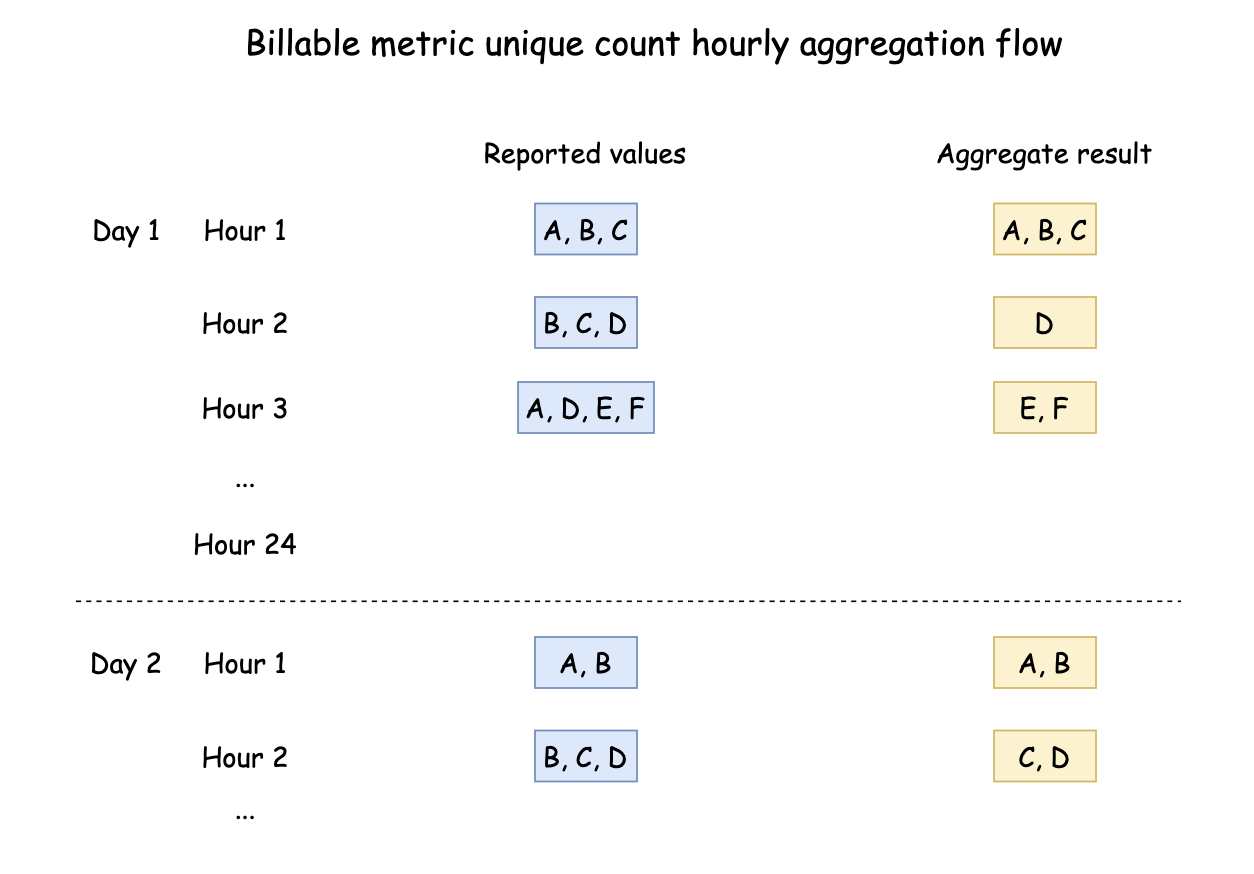
If the billable metric is configured with unique count aggregation type, the calculation is more complex.
- First, Fours gets a unique array of the target attribute values from the report records within that hour — in other words, the same value appears only once in the array.
- Then Fours reads all the unique arrays of the previous hourly reports today and removes duplicate values from the current hour's unique array, making it smaller.
- Finally, the unique array represents the new values' unique count in this hour of today.
The deduplicate target is only today's data, so every first hour of each day is a little larger than the other hours.
:::tip
The design principle of this aggregation is that the data stored per hour is incremental data and has been deduplicated. This allows the calculation costs to be shared in terms of both computation and storage per hour.
These hourly reports are incremental data, so they can be used directly in the subsequent daily report and invoice amount calculation.
:::
### Aggregation with unique count
If the billable metric is configured with unique count aggregation type, the calculation is more complex.
- First, Fours gets a unique array of the target attribute values from the report records within that hour — in other words, the same value appears only once in the array.
- Then Fours reads all the unique arrays of the previous hourly reports today and removes duplicate values from the current hour's unique array, making it smaller.
- Finally, the unique array represents the new values' unique count in this hour of today.
The deduplicate target is only today's data, so every first hour of each day is a little larger than the other hours.
:::tip
The design principle of this aggregation is that the data stored per hour is incremental data and has been deduplicated. This allows the calculation costs to be shared in terms of both computation and storage per hour.
These hourly reports are incremental data, so they can be used directly in the subsequent daily report and invoice amount calculation.
:::
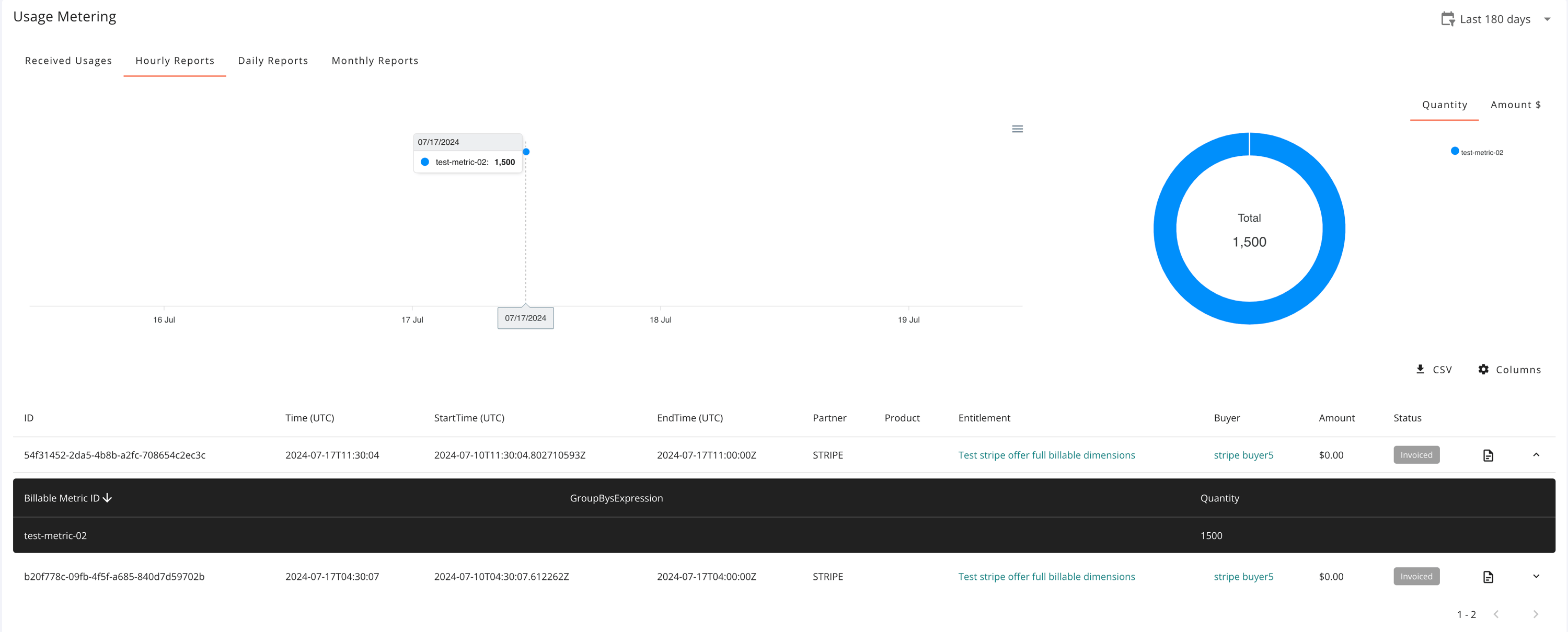
The hourly reports can be viewed on the entitlement details page.
 ## Usage daily report
Like the hourly report, the daily report of each entitlement is aggregated every day. The daily report is aggregated from the hourly reports instead of the original reported data.
| Billable metric's aggregate type | Daily report aggregation logic |
| :------------------------------- | :------------------------------------------------ |
| COUNT | The sum of all hourly reports's counts |
| UNIQUE COUNT | The sum of all hourly reports's unique counts |
| SUM | The sum of all hourly reports's sum results |
| MAX | The largest value of all hourly reports's results |
| LATEST | The value of the latest hourly report result |
## Usage daily report
Like the hourly report, the daily report of each entitlement is aggregated every day. The daily report is aggregated from the hourly reports instead of the original reported data.
| Billable metric's aggregate type | Daily report aggregation logic |
| :------------------------------- | :------------------------------------------------ |
| COUNT | The sum of all hourly reports's counts |
| UNIQUE COUNT | The sum of all hourly reports's unique counts |
| SUM | The sum of all hourly reports's sum results |
| MAX | The largest value of all hourly reports's results |
| LATEST | The value of the latest hourly report result |
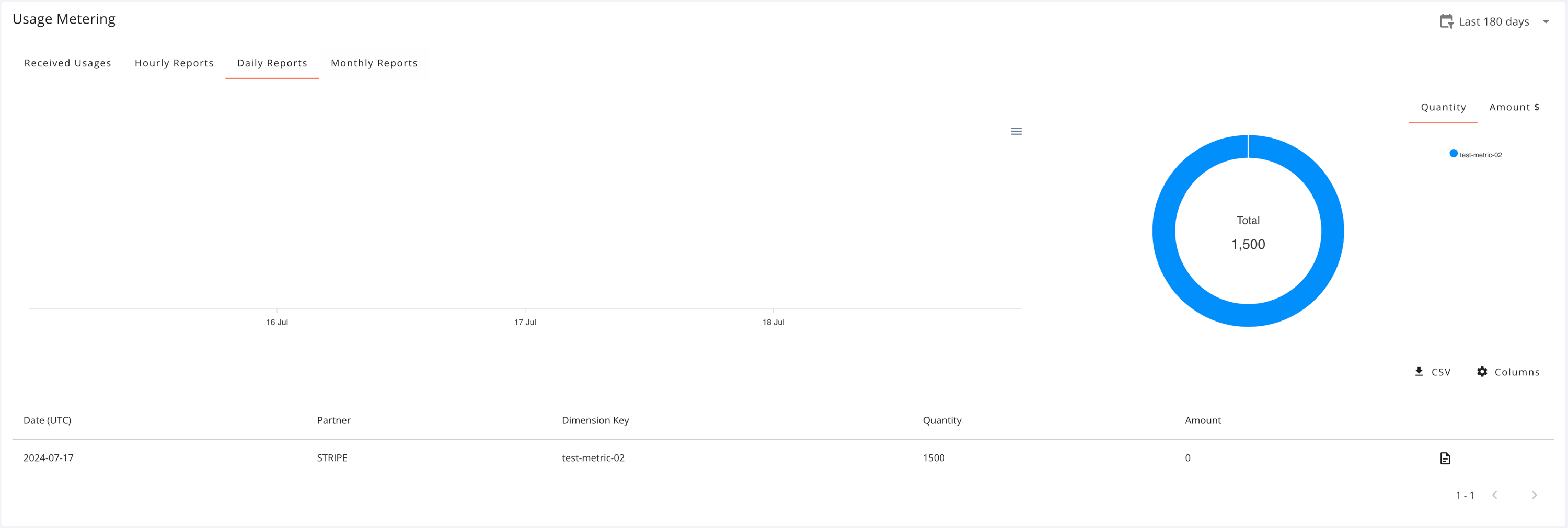
The daily reports can be viewed on the entitlement details page.
 ## Calculate usage invoice fee
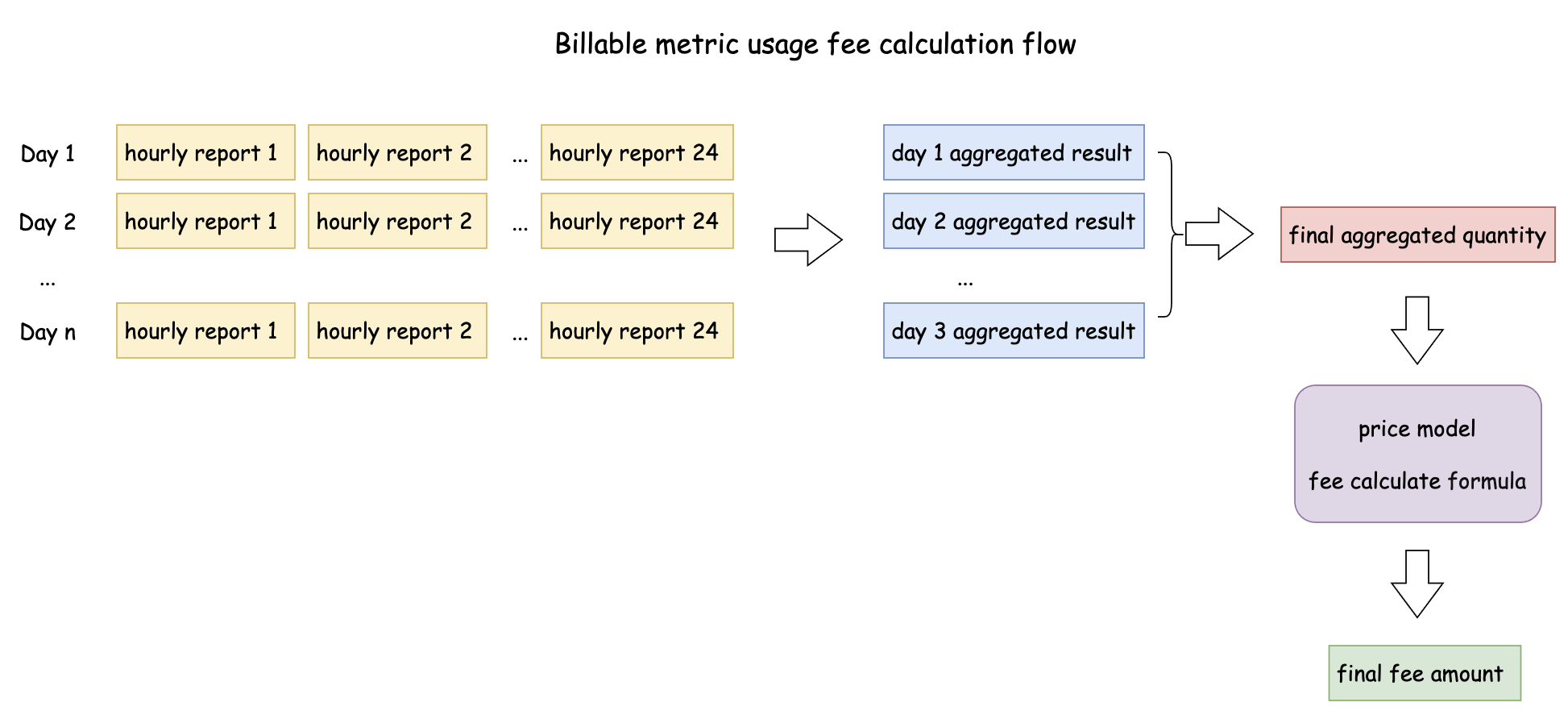
When an entitlement's billing cycle is over, Fours calculates the [usage invoice](https://doc.fours.com/billing/invoice/#usage-invoice), which requires aggregating all the report records of the entitlement in the billing cycle.
The source of the calculation data is the hourly reports rather than the original reported data, since the hourly reports have already been aggregated.
- First, calculate the aggregated daily quantity of each billable metric within the invoice period based on the hourly report.
- Then calculate the final aggregated quantity of each billable metric based on daily aggregated data.
- Finally, calculate the final fee amount from the quantity according to the price model of each billable metric.
:::tip
We calculate daily data first instead of calculating the final data from hourly reports in one step because the hourly report data may be too large when the billing interval is long.
:::
## Calculate usage invoice fee
When an entitlement's billing cycle is over, Fours calculates the [usage invoice](https://doc.fours.com/billing/invoice/#usage-invoice), which requires aggregating all the report records of the entitlement in the billing cycle.
The source of the calculation data is the hourly reports rather than the original reported data, since the hourly reports have already been aggregated.
- First, calculate the aggregated daily quantity of each billable metric within the invoice period based on the hourly report.
- Then calculate the final aggregated quantity of each billable metric based on daily aggregated data.
- Finally, calculate the final fee amount from the quantity according to the price model of each billable metric.
:::tip
We calculate daily data first instead of calculating the final data from hourly reports in one step because the hourly report data may be too large when the billing interval is long.
:::
 ### Aggregation with groupby
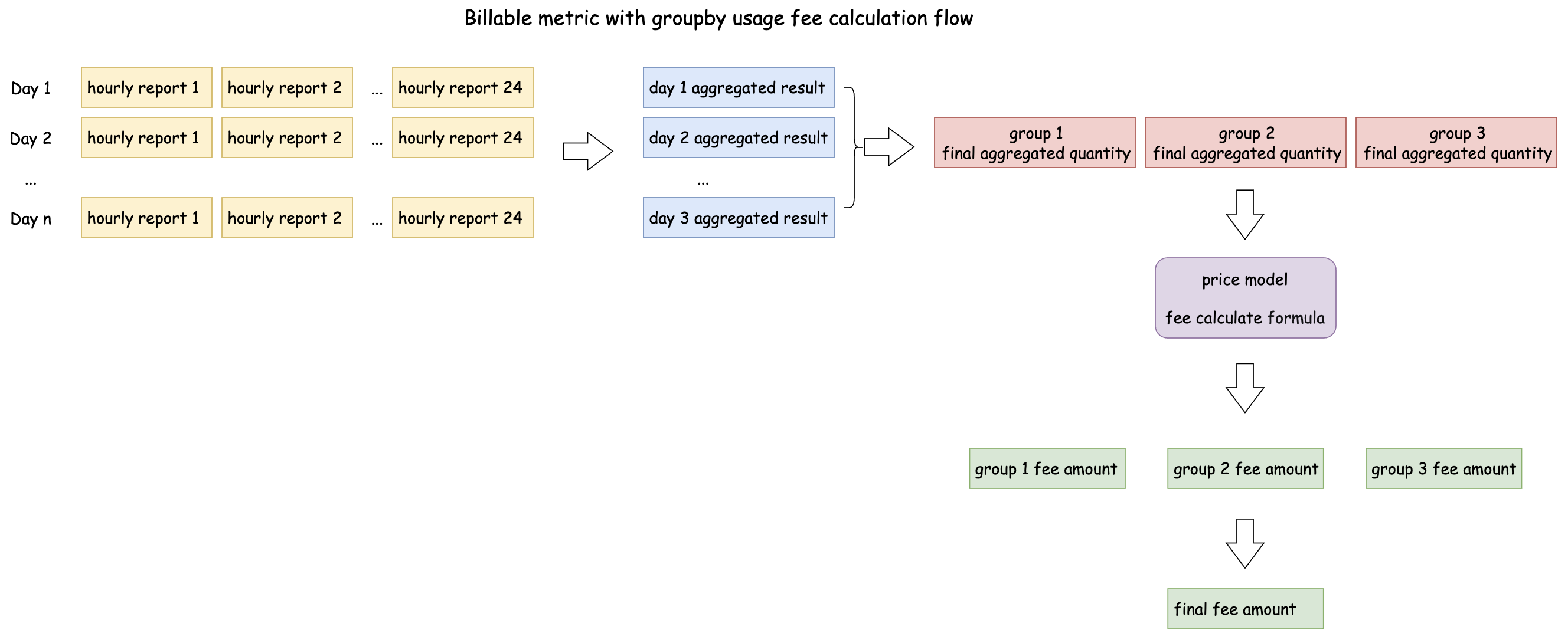
If the billable metric is configured with groupby attributes, the hourly and daily aggregation results, as well as the total quantity, are calculated for multiple results based on the combination of the groupby attributes.
Each group gets the aggregated quantity, and the price model is applied to each group. The final invoice amount is the sum of all the groups' amounts.
### Aggregation with groupby
If the billable metric is configured with groupby attributes, the hourly and daily aggregation results, as well as the total quantity, are calculated for multiple results based on the combination of the groupby attributes.
Each group gets the aggregated quantity, and the price model is applied to each group. The final invoice amount is the sum of all the groups' amounts.
 ### Aggregation with unique count
If the billable metric is configured with unique count aggregation type, Fours calculates the unique count of the target attribute values from all the report records within the invoice period, still using the hourly reports because each hourly report has already been deduplicated.
- Daily data is aggregated from the hourly reports first. In this step Fours gets a unique array for today by merging all unique arrays of all hourly reports today.
- Then Fours merges and deduplicates all daily unique arrays in the invoice period.
- Finally Fours gets the unique array of the invoice period and its unique count.
## Troubleshooting
| Issue | Cause | Resolution |
| --- | --- | --- |
| `400 Bad Request` — *usage record group already reported in the last 15 days* | The same `id` was already received for this entitlement in the last 15 days. | Ensure your service generates a completely unique identifier for every fresh usage event payload. |
| `400 Bad Request` / dimension error | The `key` in the payload doesn't match the marketplace schema. | Verify your keys match the dimension key or name in `WorkloadEntitlement.info.dimensions`, or configure a Metering Dimension Conversion map. |
| Usage appears in a later hour or month than it occurred | For AWS and Azure, Fours reports usage in the hour it sends it, not the hour of its `timestamp`. | Report usage to Fours as close to real time as you can, and before the month it belongs to ends. See [Reporting late usage](/metering/usage-metering/#reporting-late-usage). |
## FAQs
**Can I use my internal telemetry names instead of the marketplace dimension keys?**
Yes. Configure **Metering Dimension Conversion** rules in Fours, and it maps your internal names to the correct marketplace dimension keys automatically — no need to change your application logic.
**What happens if my backend reports the same usage record twice?**
If you include a unique `id` (highly recommended), Fours' de-duplication rejects a second request with the same `id` within 15 days with `400 Bad Request`, so the customer isn't double-billed.
**How does Fours handle delayed reporting?**
Fours accepts it, however old its `timestamp` is, and sends it in the next hourly report: AWS and Azure receive it in the hour Fours reports it, GCP in an interval reaching back at most three hours, and Oracle with its original timestamps.
**Can my customers see how their usage charges split across business units?**
Yes, for AWS Marketplace purchases. Implement **AWS Usage Allocation Tags** to bind metadata to usage records; the tags pass into the customer's AWS Billing Console, letting them track charges by department or cost center.
**Do we need to write code to connect Orb or Metronome?**
No. These are native, code-free integrations. Authenticate the connection with your billing platform's API keys and map your usage dimensions.
**Can we run an API integration alongside a native billing connector?**
Yes. Fours supports hybrid workflows — for example, Orb for standard metric counts and direct Fours API calls for ad-hoc professional-service milestones.
### Aggregation with unique count
If the billable metric is configured with unique count aggregation type, Fours calculates the unique count of the target attribute values from all the report records within the invoice period, still using the hourly reports because each hourly report has already been deduplicated.
- Daily data is aggregated from the hourly reports first. In this step Fours gets a unique array for today by merging all unique arrays of all hourly reports today.
- Then Fours merges and deduplicates all daily unique arrays in the invoice period.
- Finally Fours gets the unique array of the invoice period and its unique count.
## Troubleshooting
| Issue | Cause | Resolution |
| --- | --- | --- |
| `400 Bad Request` — *usage record group already reported in the last 15 days* | The same `id` was already received for this entitlement in the last 15 days. | Ensure your service generates a completely unique identifier for every fresh usage event payload. |
| `400 Bad Request` / dimension error | The `key` in the payload doesn't match the marketplace schema. | Verify your keys match the dimension key or name in `WorkloadEntitlement.info.dimensions`, or configure a Metering Dimension Conversion map. |
| Usage appears in a later hour or month than it occurred | For AWS and Azure, Fours reports usage in the hour it sends it, not the hour of its `timestamp`. | Report usage to Fours as close to real time as you can, and before the month it belongs to ends. See [Reporting late usage](/metering/usage-metering/#reporting-late-usage). |
## FAQs
**Can I use my internal telemetry names instead of the marketplace dimension keys?**
Yes. Configure **Metering Dimension Conversion** rules in Fours, and it maps your internal names to the correct marketplace dimension keys automatically — no need to change your application logic.
**What happens if my backend reports the same usage record twice?**
If you include a unique `id` (highly recommended), Fours' de-duplication rejects a second request with the same `id` within 15 days with `400 Bad Request`, so the customer isn't double-billed.
**How does Fours handle delayed reporting?**
Fours accepts it, however old its `timestamp` is, and sends it in the next hourly report: AWS and Azure receive it in the hour Fours reports it, GCP in an interval reaching back at most three hours, and Oracle with its original timestamps.
**Can my customers see how their usage charges split across business units?**
Yes, for AWS Marketplace purchases. Implement **AWS Usage Allocation Tags** to bind metadata to usage records; the tags pass into the customer's AWS Billing Console, letting them track charges by department or cost center.
**Do we need to write code to connect Orb or Metronome?**
No. These are native, code-free integrations. Authenticate the connection with your billing platform's API keys and map your usage dimensions.
**Can we run an API integration alongside a native billing connector?**
Yes. Fours supports hybrid workflows — for example, Orb for standard metric counts and direct Fours API calls for ad-hoc professional-service milestones.