# Co-Sell Insights
Fours Insights powered by AWS Co-Sell Agents.
---
## Overview
The Fours Widget **Insights Tab** uses pre-defined triggers to evaluate your opportunity data. It then surfaces actionable cards powered by AWS Co-Sell AI Agents to provide proactive guidance on deal progression, funding eligibility, and risk mitigation.
## Prerequisites
To use these AI-powered features, the following must be in place:
- **AWS PC 3.0 Migration**: Your ACE account must be migrated to AWS Partner Central 3.0.
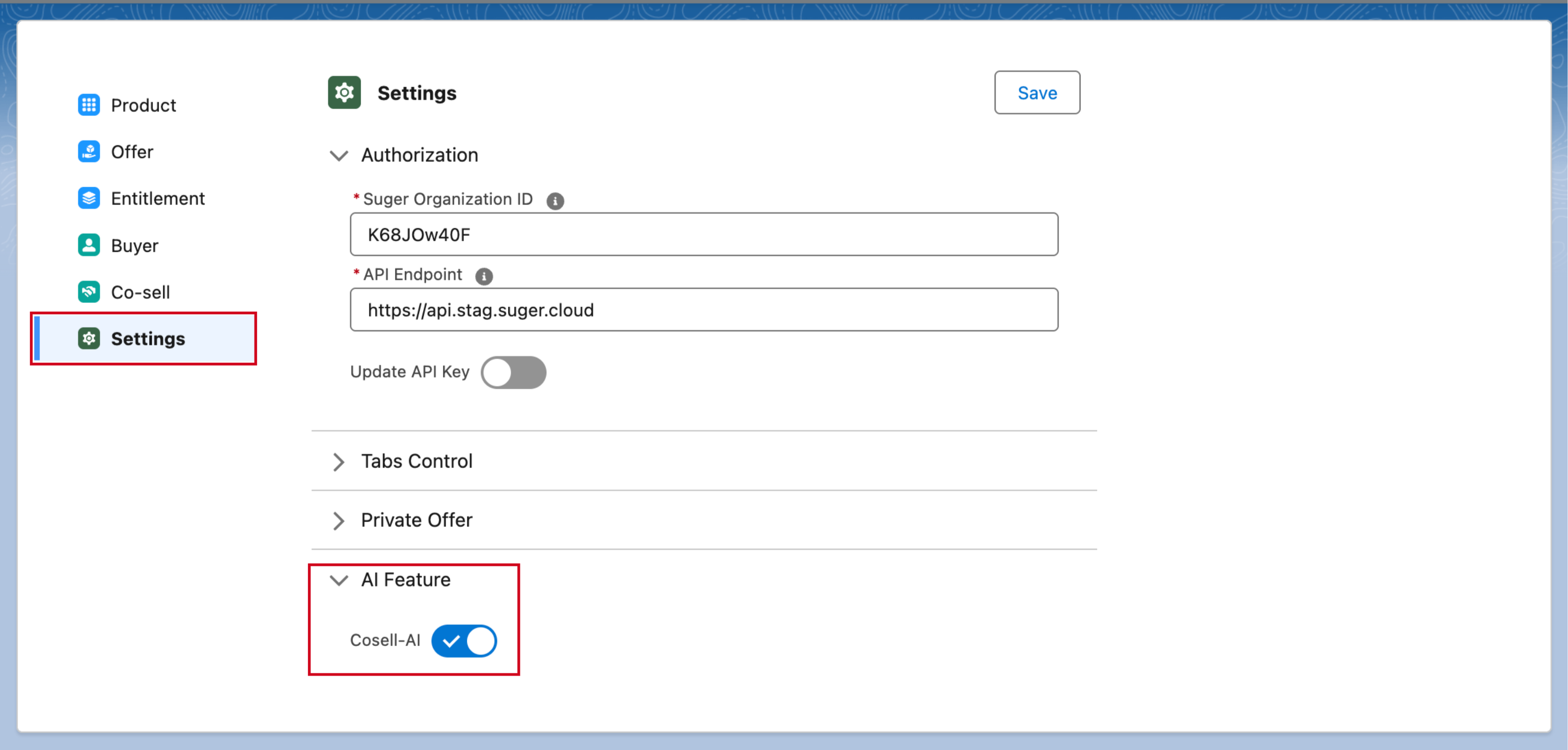
- **Co-sell AI enabled by Fours**: The Cosell-AI feature is switched on by Fours, not by your team. Contact [support@suger.io](mailto:support@suger.io) to have it enabled for your organization.
>  ## How it Works
The Insights Tab is organized around three distinct card types, following a strict visual hierarchy:
### 1. Warning Cards (Fours-Computed)
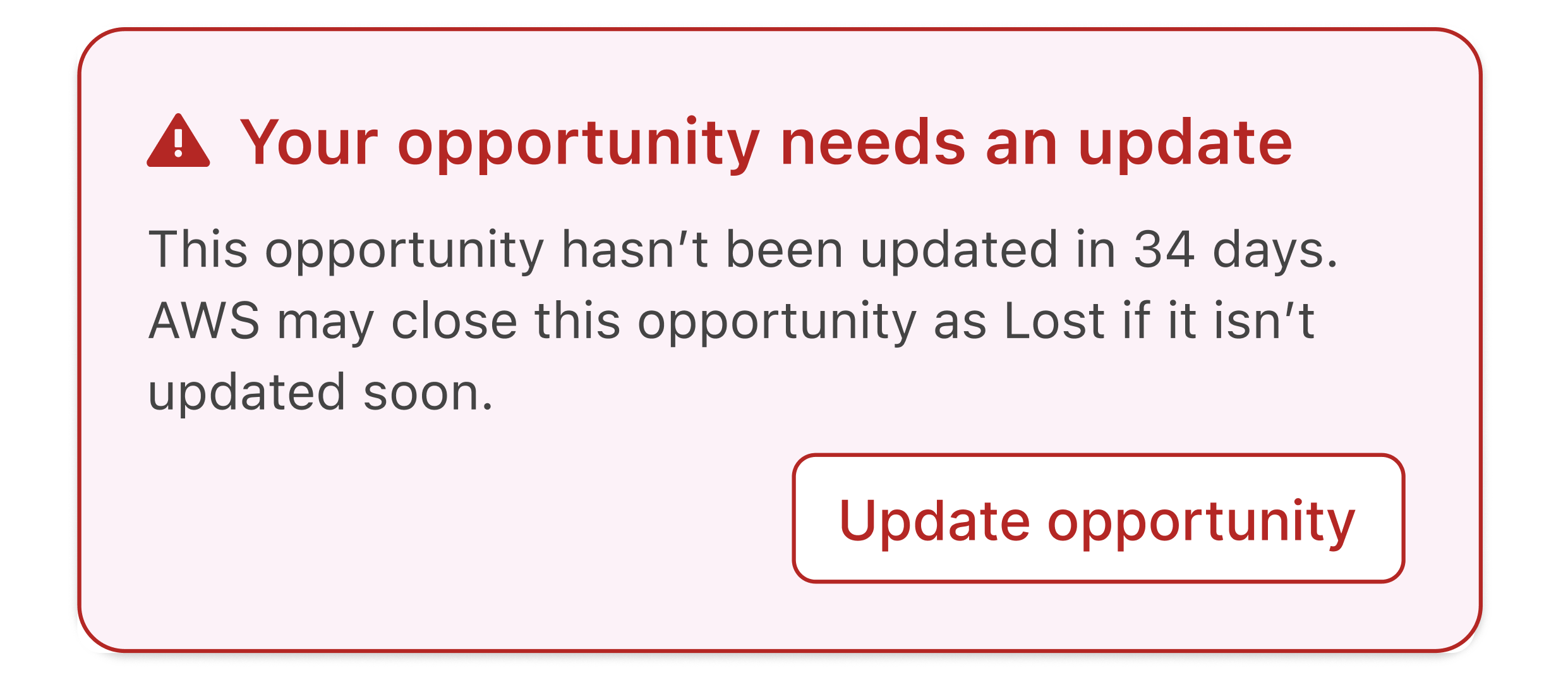
These are deterministic alerts rendered immediately at the absolute top of the AI Tab.
- **Visibility**: Always visible when a trigger condition is met (e.g., an opportunity hasn't been updated in 30+ days).
- **Interaction**: These often include inline CTAs like "Update Close Date". You can dismiss them for the current session, but they will reappear on your next visit if the condition persists.
>
## How it Works
The Insights Tab is organized around three distinct card types, following a strict visual hierarchy:
### 1. Warning Cards (Fours-Computed)
These are deterministic alerts rendered immediately at the absolute top of the AI Tab.
- **Visibility**: Always visible when a trigger condition is met (e.g., an opportunity hasn't been updated in 30+ days).
- **Interaction**: These often include inline CTAs like "Update Close Date". You can dismiss them for the current session, but they will reappear on your next visit if the condition persists.
>  ### 2. Main Insight Cards (AWS MCP Powered)
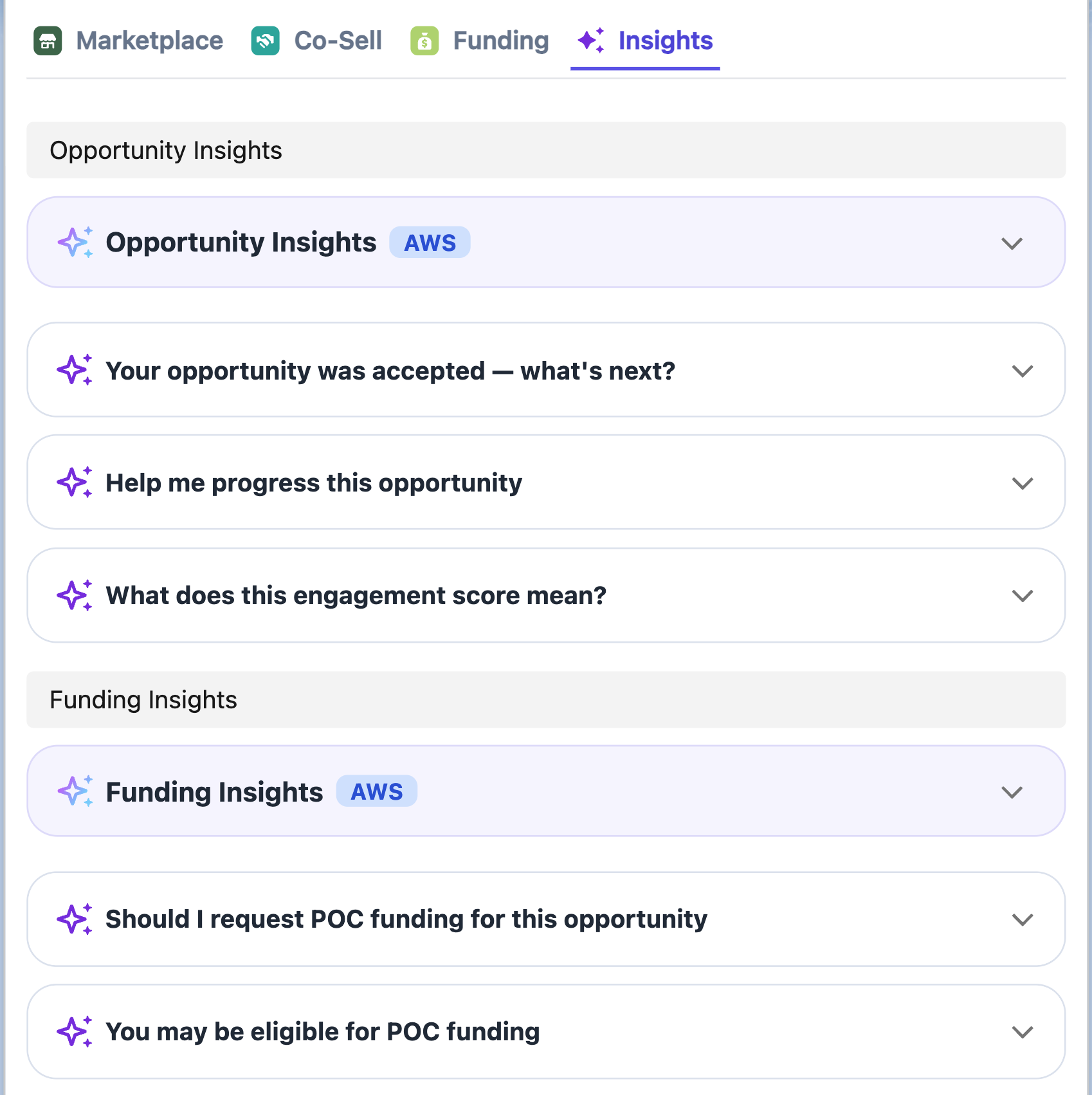
These cards are fetched from AWS MCP when the AI Tab loads and are cached for approximately 10 days.
- **Opportunity Insights**: Provides a summary of general opportunity health, engagement scores, and quick wins.
- **Funding Insights**: Surfaces eligibility for programs like POC funding or MDF (available for approved/accepted opportunities).
### 3. AI Trigger Cards (Recommended Actions)
These cards map to specific conditions in the AWS ACE opportunity lifecycle and appear grouped beneath their parent Insight Card.
- **Interaction**: Click a card (e.g., "Help me progress this opportunity") to expand it.
- **Examples**: "Why was this rejected?", "Request POC funding", or "Get pricing and business case support".
>
### 2. Main Insight Cards (AWS MCP Powered)
These cards are fetched from AWS MCP when the AI Tab loads and are cached for approximately 10 days.
- **Opportunity Insights**: Provides a summary of general opportunity health, engagement scores, and quick wins.
- **Funding Insights**: Surfaces eligibility for programs like POC funding or MDF (available for approved/accepted opportunities).
### 3. AI Trigger Cards (Recommended Actions)
These cards map to specific conditions in the AWS ACE opportunity lifecycle and appear grouped beneath their parent Insight Card.
- **Interaction**: Click a card (e.g., "Help me progress this opportunity") to expand it.
- **Examples**: "Why was this rejected?", "Request POC funding", or "Get pricing and business case support".
>  ## AWS Opportunity Quality Score
Before you submit an opportunity to ACE, Fours predicts how AWS is likely to rate its
quality — so you can improve it while editing rather than after a rejection.
:::info
The quality score is **AWS-only**. There is no Azure or GCP equivalent, and the banner
does not appear on referrals to those partners.
:::
### Where you see it
The score appears as a **Predicted AWS quality score** banner in the ACE submission
dialog. After you change the fields the score depends on, click **Re-analyze** to score
the opportunity again with your edits.

When AWS has scored the opportunity in ACE, its own score appears on the referral too. On an
AWS referral's detail page, the **AWS Opportunity Quality** panel at the top of the right sidebar
shows AWS's **Quality Score**, with the **Quality Trend**, the **Co-Sell Motion**, and the
**AWS Recommendation**. The info icon beside the score reads *AWS's quality score for this
opportunity in ACE, as reported by AWS.* That score is AWS's, not Fours' prediction. The panel is
hidden until AWS has returned at least one of these.
### How the score is read
The score runs from **0 to 100** and falls into one of five bands:
| Band | Score |
| --- | --- |
| **Lowest** | 0–10 |
| **Low** | 11–25 |
| **Medium** | 26–39 |
| **High** | 40–49 |
| **Highest** | 50 and above |
The number comes from a rubric of **8 weighted dimensions** evaluated across the
opportunity — no single field decides it, so improving one weak area moves the score
rather than transforming it.
### The business-problem gate
One check overrides everything else. If the **Customer Business Problem** is a
placeholder, too short, or reads as a pitch for your product rather than a description of
the customer's problem, the score is forced to **0** regardless of how strong the rest of
the opportunity is.
That gate is deliberate: AWS partner managers read the business problem first, and a
weak one sinks an otherwise good opportunity. If your score is 0, rewrite the business
problem before looking at anything else.
## Generate the Customer Business Problem with AI
Because the business problem carries so much weight, Fours can draft it for you. Use
**Generate with AI** on the **Customer Business Problem** field.
**Generate with AI** is part of the ACE submission dialog for the
[AWS Partner Central API integration](/integrations/aws-partner-network-api/). It is not
available on the deprecated [legacy S3 integration](/integrations/aws-partner-network-s3/).
What you get back:
- **2–4 sentences**, written **from the customer's perspective** — the problem they have,
not the product you sell.
- Length inside AWS's expectations. The existing rule still applies: Fours instructs the
AI to produce **500–1,800 characters** and truncates anything over 1,800.
If your organization has defined its own prompt for this field in the co-sell field
mapping configuration, that prompt is used instead of Fours' default — so you can steer
tone and emphasis for your whole team in one place. See
[Field Mapping](/cosell/cosell-configuration/) for where the prompt lives.
## Engagement Score
The engagement score estimates how engaged a customer already is with a cloud partner. It
is reported as one of three values:
**`High`** · **`Medium`** · **`Low`**
Fours resolves it from the best source available, in order:
1. **Partner** — the score the cloud partner itself reports for the customer.
2. **Marketplace** — derived from the customer's activity on that partner's marketplace,
used when the partner reports no score.
3. **AI** — an AI-derived estimate, used as the fallback when neither of the above is
available.
The score is refreshed every **6 hours**, so a newly created customer record may take a
cycle before a score appears.
### Two different scores, named apart
A cloud partner may score a specific opportunity itself. Where it has not, Fours predicts
one instead. These are different things, so they carry different names rather than being
tagged:
| What you see | What it is |
| --- | --- |
| **Fours Predicted Engagement Score** | Fours' own prediction, from the customer's marketplace listings and purchases and from AI analysis of third-party signals. |
| A score on the referral, under **Engagement Score** | The cloud partner's own score for that opportunity. |
| **Not provided by AWS** | AWS has not scored this opportunity. Only AWS referrals show this, because Azure and GCP never supply a score of their own. |
**Azure and GCP never supply an engagement score of their own**, so a score shown for
either is always Fours' prediction.
Fours' prediction appears in the Fours widget on the Account and Opportunity pages, under
its own heading. It is deliberately not shown on an AWS referral: the referral's score is
AWS's own, and mixing the two there is what used to make a prediction look like a number AWS
had supplied. Azure and GCP referral cards in the Salesforce app have no partner score to
confuse it with, so they show a row labelled **Suger Predicted Engagement Score** instead
(N/A when Fours has no prediction).
In HubSpot, the prediction appears on the deal's **Insights** tab and on the **Co-sell
Insights** company card. See
[Engagement score on the Insights tab](/hubspot-app/hubspot-app-cosell/#engagement-score-on-the-insights-tab).
### Only a partner score reaches your reports
This is the part worth knowing before you build a report.
In Salesforce, only the partner's own score for that opportunity is written to the referral
record's **AWS Marketplace Engagement Score** field (`Suger__AWS_EngagementScore__c`). The
**Suger Predicted Engagement Score** is calculated for display and stored against the
customer's domain in Fours, not on the referral — so it appears in the Fours widget and is
blank in any report, list view, formula field or automation built on that field.
A blank column in a report therefore means one thing: **AWS has not scored that opportunity
yet.** It does not mean the score was lost. The same note appears on the field itself, in
the help text beside **AWS Marketplace Engagement Score** on the referral record.
## AWS Opportunity Quality Score
Before you submit an opportunity to ACE, Fours predicts how AWS is likely to rate its
quality — so you can improve it while editing rather than after a rejection.
:::info
The quality score is **AWS-only**. There is no Azure or GCP equivalent, and the banner
does not appear on referrals to those partners.
:::
### Where you see it
The score appears as a **Predicted AWS quality score** banner in the ACE submission
dialog. After you change the fields the score depends on, click **Re-analyze** to score
the opportunity again with your edits.

When AWS has scored the opportunity in ACE, its own score appears on the referral too. On an
AWS referral's detail page, the **AWS Opportunity Quality** panel at the top of the right sidebar
shows AWS's **Quality Score**, with the **Quality Trend**, the **Co-Sell Motion**, and the
**AWS Recommendation**. The info icon beside the score reads *AWS's quality score for this
opportunity in ACE, as reported by AWS.* That score is AWS's, not Fours' prediction. The panel is
hidden until AWS has returned at least one of these.
### How the score is read
The score runs from **0 to 100** and falls into one of five bands:
| Band | Score |
| --- | --- |
| **Lowest** | 0–10 |
| **Low** | 11–25 |
| **Medium** | 26–39 |
| **High** | 40–49 |
| **Highest** | 50 and above |
The number comes from a rubric of **8 weighted dimensions** evaluated across the
opportunity — no single field decides it, so improving one weak area moves the score
rather than transforming it.
### The business-problem gate
One check overrides everything else. If the **Customer Business Problem** is a
placeholder, too short, or reads as a pitch for your product rather than a description of
the customer's problem, the score is forced to **0** regardless of how strong the rest of
the opportunity is.
That gate is deliberate: AWS partner managers read the business problem first, and a
weak one sinks an otherwise good opportunity. If your score is 0, rewrite the business
problem before looking at anything else.
## Generate the Customer Business Problem with AI
Because the business problem carries so much weight, Fours can draft it for you. Use
**Generate with AI** on the **Customer Business Problem** field.
**Generate with AI** is part of the ACE submission dialog for the
[AWS Partner Central API integration](/integrations/aws-partner-network-api/). It is not
available on the deprecated [legacy S3 integration](/integrations/aws-partner-network-s3/).
What you get back:
- **2–4 sentences**, written **from the customer's perspective** — the problem they have,
not the product you sell.
- Length inside AWS's expectations. The existing rule still applies: Fours instructs the
AI to produce **500–1,800 characters** and truncates anything over 1,800.
If your organization has defined its own prompt for this field in the co-sell field
mapping configuration, that prompt is used instead of Fours' default — so you can steer
tone and emphasis for your whole team in one place. See
[Field Mapping](/cosell/cosell-configuration/) for where the prompt lives.
## Engagement Score
The engagement score estimates how engaged a customer already is with a cloud partner. It
is reported as one of three values:
**`High`** · **`Medium`** · **`Low`**
Fours resolves it from the best source available, in order:
1. **Partner** — the score the cloud partner itself reports for the customer.
2. **Marketplace** — derived from the customer's activity on that partner's marketplace,
used when the partner reports no score.
3. **AI** — an AI-derived estimate, used as the fallback when neither of the above is
available.
The score is refreshed every **6 hours**, so a newly created customer record may take a
cycle before a score appears.
### Two different scores, named apart
A cloud partner may score a specific opportunity itself. Where it has not, Fours predicts
one instead. These are different things, so they carry different names rather than being
tagged:
| What you see | What it is |
| --- | --- |
| **Fours Predicted Engagement Score** | Fours' own prediction, from the customer's marketplace listings and purchases and from AI analysis of third-party signals. |
| A score on the referral, under **Engagement Score** | The cloud partner's own score for that opportunity. |
| **Not provided by AWS** | AWS has not scored this opportunity. Only AWS referrals show this, because Azure and GCP never supply a score of their own. |
**Azure and GCP never supply an engagement score of their own**, so a score shown for
either is always Fours' prediction.
Fours' prediction appears in the Fours widget on the Account and Opportunity pages, under
its own heading. It is deliberately not shown on an AWS referral: the referral's score is
AWS's own, and mixing the two there is what used to make a prediction look like a number AWS
had supplied. Azure and GCP referral cards in the Salesforce app have no partner score to
confuse it with, so they show a row labelled **Suger Predicted Engagement Score** instead
(N/A when Fours has no prediction).
In HubSpot, the prediction appears on the deal's **Insights** tab and on the **Co-sell
Insights** company card. See
[Engagement score on the Insights tab](/hubspot-app/hubspot-app-cosell/#engagement-score-on-the-insights-tab).
### Only a partner score reaches your reports
This is the part worth knowing before you build a report.
In Salesforce, only the partner's own score for that opportunity is written to the referral
record's **AWS Marketplace Engagement Score** field (`Suger__AWS_EngagementScore__c`). The
**Suger Predicted Engagement Score** is calculated for display and stored against the
customer's domain in Fours, not on the referral — so it appears in the Fours widget and is
blank in any report, list view, formula field or automation built on that field.
A blank column in a report therefore means one thing: **AWS has not scored that opportunity
yet.** It does not mean the score was lost. The same note appears on the field itself, in
the help text beside **AWS Marketplace Engagement Score** on the referral record.